Contact center AI has moved well past the pilot phase. Calabrio’s 2025 State of the Contact Center report found that 98% of contact centers are now using AI. Back in 2022, Gartner predicted that conversational AI would reduce contact center agent labor costs by $80 billion by 2026; a number that seemed ambitious at the time, but doesn’t anymore.
Now instead of asking whether to adopt AI in the contact center, we’re asking why it isn’t delivering.
S&P Global found that 42% of enterprises abandoned the majority of their AI initiatives before reaching production: up from 17% just one year earlier. IBM’s data shows only 1 in 4 AI projects delivers its promised ROI.
Klarna is the clearest case study. The company replaced roughly 700 customer service staff with an AI chatbot handling 2.3 million conversations monthly. Productivity numbers looked strong at first. Then satisfaction dropped. Customers hit robotic responses, inflexible scripts, nothing that could handle complexity, and by May 2025, Klarna was rehiring human agents.
Table of contents
Five Reasons Contact Center AI Fails After Go-Live
The research shows that most contact center AI failures come from at least one of five possible reasons.
No KPIs Defined
Contact center AI projects that skip goal definition at the start almost always struggle to demonstrate value later. McKinsey’s 2025 research found that organizations reporting significant financial returns from AI are twice as likely to have redesigned their end-to-end workflows before selecting any technology.
Unusable Data
Only 3% of contact centers operate on a single unified platform, according to the Puzzel State of Contact Centres 2026 report. The average contact center organization manages 3.9 different technologies, and half of CX leaders say this fragmentation directly drives up maintenance costs. Nearly as many cite data inconsistency as a direct consequence.
When AI is layered onto that fragmented stack, it inherits every gap. It cannot route accurately if call history lives in one system and agent availability in another. It cannot generate a useful summary if the transcript doesn’t capture the full interaction.
Problematic Integrations
When telephony systems, CRM platforms, and AI services operate independently, data can’t flow across the customer interaction the way it needs to. Each handoff between systems is a point where something can drop.
This is especially relevant for organizations using Microsoft Teams as their communication platform, as the way a contact center connects to Teams matters. The Connect model, used by several large CCaaS providers, routes calls outside of Teams via a session border controller and passes them back as an endpoint. The AI layer sits between the call and Teams, creating authentication overhead and data handoff points that the IT team inherits as support burden. The more components in that chain, the more places the deployment can fail.
Low Trust or Use of the Tool
A CX Today workforce analysis from April 2026 found that 73% of contact center leaders said after-call work stayed the same or increased after AI deployment. If after-call work hasn’t decreased, agents aren’t using the AI tools the way the deployment intended. Or they’re doing cleanup work the AI created.
Calabrio found that 61% are experiencing more emotionally charged customer interactions after AI deployment. Simpler interactions are now being handled by AI, leaving human agents to manage the calls that require real judgment and empathy.
Metrics That Stop Making Sense After AI Deployment
InflectionCX’s 2026 Operator’s Guide found a counterintuitive fact: as AI handles simpler interactions, average handle time for human agents goes up. The AI is doing its job. Agents are now only handling the harder calls. But if the reporting framework wasn’t updated to account for this shift, the dashboards show declining agent performance. A manager who doesn’t recognize what’s happening may penalize agents or question the value of the AI system at exactly the wrong moment.
Research Backed Techniques for Success
Failures are well-documented. But so are the factors that separate deployments that deliver from those that don’t.
McKinsey found that organizations that see significant financial returns from AI are twice as likely to have redesigned workflows before selecting technology. Define the operational problem first, identify which KPIs would signal improvement, then find the tool that addresses it.
Start with one use case and prove it before expanding. A contact center might deploy AI solely to automate after-call summaries, targeting a specific reduction in agent wrap-up time, then track results and adjust before moving to routing or agent assist. Broad rollouts fail because there’s no opportunity to refine before scale creates the consequences of every early design flaw.
The Puzzel 2026 data offers a useful benchmark: 83% of CX leaders who said AI-powered self-service is effective had embedded it into their CCaaS workflows with governance and data discipline. Only 34% of organizations that said they were prepared to implement AI felt fully prepared to execute at scale.
On productivity: the most rigorous academic study available is the NBER paper by Brynjolfsson, Li, and Raymond, published in the Quarterly Journal of Economics in 2025. It tracked 5,179 customer support agents using a generative AI assistant and found a 14% average increase in issues resolved per hour. The gains were concentrated among newer and lower-skilled agents, who improved by 34-35%. Experienced agents saw minimal change.
What AI in a Microsoft Teams Contact Center Looks Like
The term “contact center AI” covers a wide range of capabilities, and not all of them require the same level of deployment complexity or organizational readiness. Here’s how AI features break down in practice within a Microsoft Teams contact center like Landis.
Natural Language Routing and IVR Automation
Instead of pressing “1 for billing, 2 for support,” callers state their need in natural language.
Landis Contact Center uses natural language processing through voice input blocks in its IVR designer to interpret what callers say and route them accordingly. An AI Query block can send a prompt to OpenAI and store the response as a variable, useful for dynamic call flows that need to pull in context before routing. For chat interactions, a Copilot Studio agent block connects the IVR directly to a Microsoft Copilot Studio agent, which can answer questions from a knowledge base or retrieve information from a CRM without agent involvement.
Transcription, Sentiment Analysis, and Agent Assist
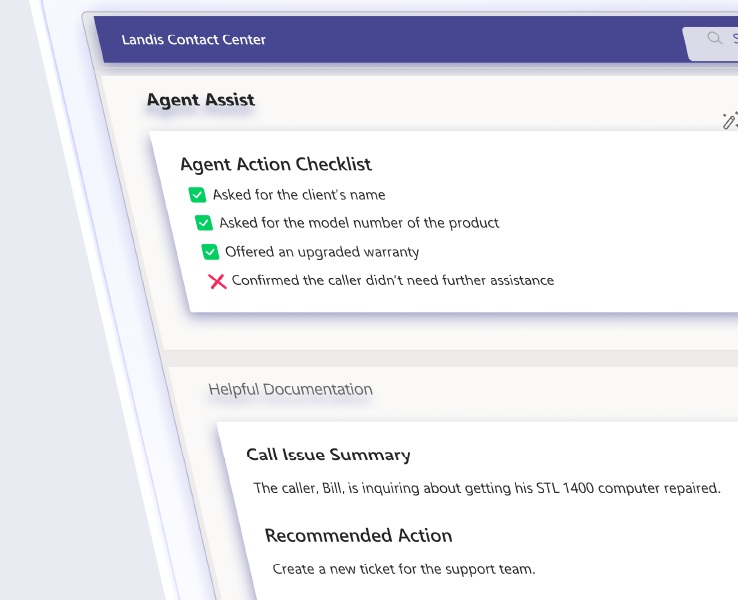
During active calls, Landis Contact Center runs real-time transcription and sentiment analysis using Azure Cognitive Services. Supervisors see live sentiment scores in the Live Calls view as conversations develop, which gives them the information to decide when to whisper-coach an agent or step in. Agents receive live AI assistance that surfaces relevant information mid-call, useful for keeping context without switching between applications.
Summaries and Searchable Transcripts
After each call or chat, Landis automatically generates a concise summary of what was discussed. Transcripts are captured and tied to caller records, making them searchable and usable for coaching. Agents can send a complete callback reminder with a single click using the summary the AI generated. No manual note-taking required.
This is also where call recording integrates with AI. Supervisors reviewing recordings have transcripts and summaries alongside the audio, which reduces the time required for quality assurance reviews.
The AI CX Consultant
Landis offers a professional services engagement called the AI CX Consultant. It combines your contact center’s actual calling and chat activity with AI analysis to produce a specific, actionable configuration report covering queue setup, routing rules, IVR flows, agent assignments, and how contact center best practices apply to your specific environment.
How Teams-Native Architecture Reduces AI Deployment Risk
As of July 2026, there are 29 certified Microsoft Teams contact center integrations. They follow three models.
The Connect model uses a session border controller to route calls. Calls leave the Teams environment, get processed externally, and return as an endpoint. Several major CCaaS providers use this model. The AI layer sits outside of Teams, which means additional authentication steps, separate data stores, and more components for the IT team to manage and troubleshoot.
The Extend model uses Microsoft’s Graph API to manage Teams calls from within the tenant. Contact center apps appear inside the Teams interface. Data access is cleaner, and the integration sits closer to the Teams environment. Landis Contact Center has operated on the Extend model and is Microsoft Teams certified.
The Unify model, introduced by Microsoft in 2025, runs on Azure Communication Services and Teams Phone Extensibility. It places the contact center directly inside the Microsoft tenant, which changes what AI can do.
Under Connect and Extend, AI features like transcription, sentiment analysis, and agent assist typically run through a layer added onto the vendor’s own infrastructure. Call audio leaves Teams, gets processed, and comes back. Under Unify, that round trip goes away. Voice, presence, and call data all sit inside the same Microsoft tenant the AI models run on. Agent assist, real-time transcription, and Copilot integrations work off that shared data instead of a separate pipeline.
The practical effect is speed and access. Fewer handoffs between systems means an AI suggestion can reach an agent mid-call instead of after it ends.
The model is still young. Nine of the eleven vendors pursuing Unify certification had completed it as of July 2026. Against the 29 providers certified across all three models, that’s a small group, which makes Unify’s native AI capabilities one of the newest parts of the Teams contact center landscape.
Landis released the first private preview of a Unify model contact center on May 20, 2025, ahead of Microsoft’s own general availability timeline. Landis also offers both models simultaneously, a practical option for organizations managing the transition. Contact centers can run the Unify model alongside the Extend model, using the proven existing setup as a bridge until the newer integration is fully in place.
Questions to Ask Before Your Next Contact Center AI Conversation
If you’re evaluating contact center AI, or trying to understand why your current deployment isn’t delivering, these questions will surface the deployment risks before they become your problem to manage.
What KPIs will this change, and how will we measure them? Any vendor that can’t answer this with specifics is selling capability, not outcomes. Get the measurement framework agreed on before signing anything.
Where does our call and interaction data currently live? If the answer involves multiple systems that don’t currently talk to each other, ask how the AI solution handles that fragmentation and who owns the data governance.
How does this solution connect to Microsoft Teams? Connect, Extend, or Unify: the answer tells you how many components sit between your agents and a working call, and how much ongoing maintenance your IT team inherits.
What does agent training and adoption look like in the first 90 days? A deployment plan without an adoption timeline and accountability structure is a plan for the 73% outcome, where after-call work stays the same because agents route around the tool.
Contact Center AI That Fits How Your Team Already Works
The deployment gap isn’t inevitable. It shows up most often when AI is added as a layer on top of existing systems, when goals aren’t defined before technology is selected, and when agents aren’t set up to actually use what was deployed.
A contact center built inside Microsoft Teams reduces the structural causes of that gap. The data is in one place. The interface is already familiar. The AI features, from natural language IVR routing to live sentiment analysis to post-call summaries, connect to the workflows your team already runs, rather than asking them to build new ones from scratch.
If you’re running Microsoft Teams and want to understand what AI-enabled contact center operations would look like for your organization, the Landis team can walk you through it. Book a demo and bring your questions.