This post was written by Kevin Kieller, a third party analyst. Read his bio.
Based on this research, we’ve created an interactive contact center selector tool at the bottom of this post that walks you through each decision and recommends the solution best for you.
Multitasking? Listen while you work!
Why we created this guide
In a typical Microsoft fashion, there are multiple options that provide advanced call handling features in conjunction with Microsoft Teams, including call queues, auto attendants, the Queues App, third-party contact centers supporting Connect, Extend, or Unify integration models, and the first-party Microsoft Dynamics 365 Contact Center.
Understanding the key differences between the various contact center architectures can be confusing and complicated.
This guide was designed to highlight key decision points so that you can define a clear path to a solution best suited to the needs of your organization.
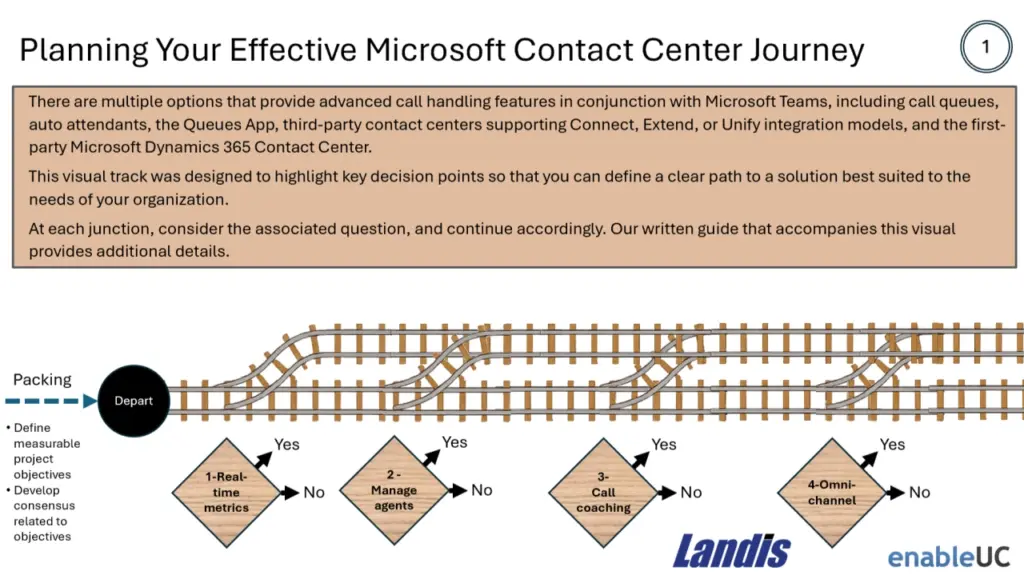
We have created a visual “track” that identifies important decision points you will need to consider to arrive at your ideal destination.
We have organized each key decision point as a “junction” along the path of your journey.
At each junction, consider the associated question, and continue accordingly. This guide provides additional details to help you traverse the most applicable contact center path.
Why a Microsoft Teams Contact Center?
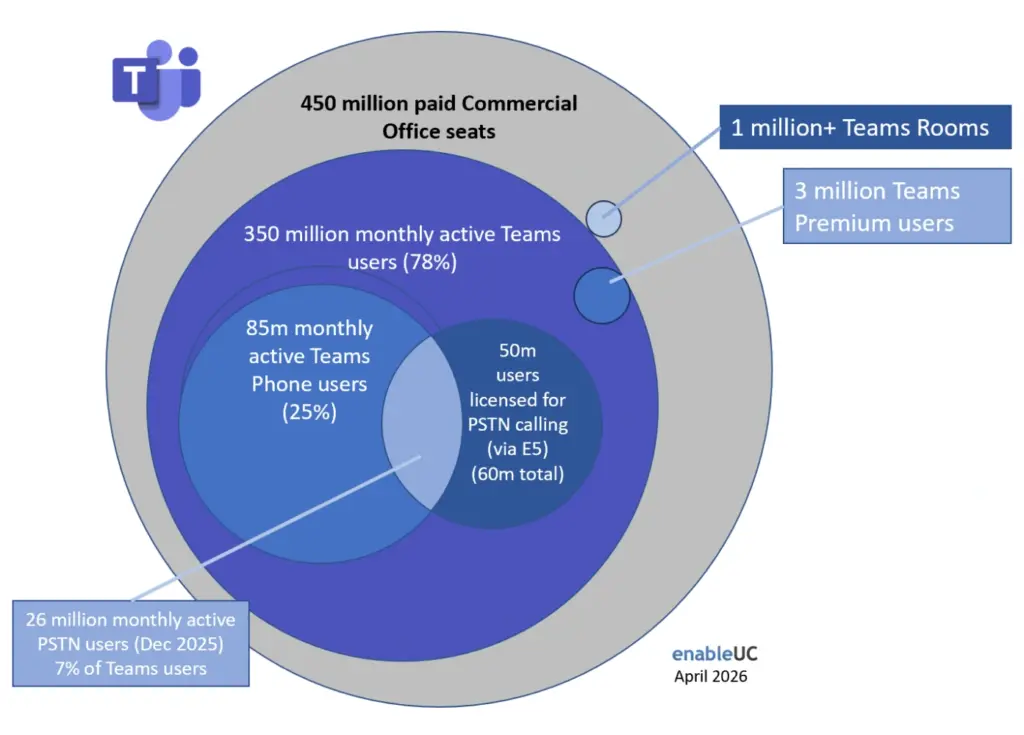
Four hundred and fifty million users have adopted Microsoft Office as their office productivity suite. Of these, 78%, or 350 million users, regularly use Teams.
For Teams users, 85 million users leverage Teams Phone to make calls, 26 million of these Teams Phone users having PSTN calling enabled.
For these Teams-centric organizations, leveraging their investment and considering Teams as a foundation for their contact center needs is a prudent choice.
All Aboard
Organizations often begin mapping their path to a Teams contact center for a variety of reasons, including:
- Their current contact center solution is end of life or end of support
- They would like to consolidate and simplify platforms
- Desire or objective to move more workloads to the cloud
- Cost reduction
- Risk reduction (concerns related to viability of current solution vendor)
- Improved customer and/or agent experience
- Desire to implement AI virtual agents
- Improved reporting and analytics
- Etc.
Understanding why you are beginning your journey is important as it helps you effectively “pack” for your trip, as described below.
Packing, before you depart
As with all trips, some preparation will make the travel more comfortable and the outcome of the experience more enjoyable and rewarding.
For a contact center project, understanding your key objectives is critical.
Without clear objectives, the number of choices can easily become overwhelming, leading to selecting a non-optimal solution. Success and failure are both woven from the same thread: the details. And yet, when evaluating options, some details will matter to your situation and others will obfuscate your best path. Vendors promote lengthy feature lists and rarely, if ever, emphasize limitations
Bringing together key project stakeholders to define, and document, clear success metrics for your contact center project will help you make informed decisions as you evaluate the different options on your journey.
Equally important, assembling key decisionmakers from your organization, allows for an open discussion to help build consensus related to the objectives of your contact center project. Building early consensus boosts your project’s chances of success and efficiency.
Once you have “packed”, you can begin considering alternatives.
Teams Call Queues and Auto Attendants
The standard Teams call queues and auto attendants in Microsoft Teams are effective for basic call distribution and menu-based routing. They can direct calls to groups of agents and provide callers with initial options. However, they lack the sophisticated oversight and analytical tools that are crucial for businesses aiming to optimize their customer interactions and agent performance.
Junction 1: Need for real-time metrics?
This includes the ability to see the number of calls currently waiting in a queue, the active-on-a-call status of agents, and individual agent availability.
If so, take this branch as the Teams call queues does not provide real-time metrics.
Junction 2: Manage agents’ participation in specific queues?
Ability for authorized users to manually change an agent’s status and opt them in or out of a specific queue. This is particularly useful for managing agent workloads, breaks, and training sessions without requiring the agent to manually adjust their settings. Standard call queues have more simplistic agent management capabilities.
Junction 3: Call coaching? Monitor, Whisper, Barge, Takeover
You will need the Queues App to allow authorized users to be able to enter a monitoring session with selected agents for private coaching. Authorized users can listen to customer calls, whisper to agents with private messages, even barge into or takeover the calls.
Junction 4: Omnichannel?
Call queues are a voice only solution.
Junction 5: Skills-based call routing?
While Teams call queues provide essential routing methods such as attendant (simultaneous ringing), serial, round robin, and longest idle, they lack the more sophisticated routing logic required for complex call handling scenarios. A primary limitation is the absence of native skills-based routing. This means calls cannot be automatically directed to the best-suited agent based on their expertise, language proficiency, or other defined skills.
Furthermore, the logic for overflow and timeout handling is basic. While calls can be redirected to another person, voicemail, or a different queue, there is no built-in functionality for more advanced actions like offering a callback while maintaining the caller’s position in the queue.
Junction 6: Integration with CRM?
Teams call queues do not automatically surface customer records based on caller ID or allow for seamless click-to-dial functionality from within a CRM platform. This disconnect can lead to inefficiencies, as agents must manually search for customer information, increasing call handling times and potentially impacting the customer experience. While integrations can be achieved through third-party solutions, they are not a built-in feature.
Junction 7: Virtual AI Agents?
Teams auto attendants support only basic voice commands, allowing a caller to say “Sales” as opposed to pressing a key to choose sales, or saying a person’s name as opposed to dialing an extension. They do not support any form of virtual agent artificial intelligence (AI) interaction.
Junction 8: Greater scale?
A Teams call queue can handle up to 200 calls and have up to 200 agents (though only 20 can be added individually without a distribution list), organizations with high call volumes and complex routing needs may find these limits restrictive.
Call Queues Summary
Microsoft Teams call queues are a powerful tool for managing internal and basic external call flows, they are not a replacement for a full-featured contact center solution. Organizations with a high volume of customer interactions, a need for advanced routing and reporting, and a reliance on CRM integration will likely find the native capabilities of Teams call queues to be a limiting factor in their customer service operations.
Upgrading Your Ticket – The Teams Queues App
The upgrade to a Teams Premium license and the subsequent access to the Queues App shifts an organization’s call handling from a basic routing system to a more data-driven and manageable contact center environment.
The ability to monitor, analyze, and actively manage call flows and agent performance in real-time provides a substantial return on investment for businesses that prioritize customer service and operational efficiency. The Queues App unlocks the potential for a much more sophisticated and responsive communication strategy.
The Queues App provides several key features beyond what is available using standard Call Queues:
Real-time monitoring provides authorized users access to basic live queue statistics including number of waiting calls, average call answer time, longest call wait time. Service level monitoring was added to the Queues App dashboard in early 2025.
Agent management allows agents to opt in in or out of queues, and managers can assign and unassign agents to various queues.
Support for call coaching: Monitor, whisper, and barge are supported.
While the Queues App provides additional capabilities, consider if you require …
Junction 9: Omnichannel?
The most significant limitation of the Teams Queues App is its primary focus on voice communication. In an era where customers expect to interact with businesses across a multitude of digital channels, this single-threaded approach is a considerable drawback. Full contact center solutions, or Contact Center as a Service (CCaaS) platforms, are built on an omnichannel philosophy, seamlessly integrating voice, email, web chat, SMS, social media, and messaging apps into a unified agent experience. This allows for a consistent and contextual customer journey, regardless of the channel they choose.
Junction 10: Virtual AI Agents?
The Queues App does not provide support for AI Agents. You will need to look to a full-fledge contact center if you intend to use AI-powered chat or voice bots.
Junction 11: Advanced or Skills-based routing?
Like native call queues, the Teams Queues App provides essential routing options such as attendant routing, serial routing, and round-robin, while lacking the sophisticated and intelligent routing engines of dedicated contact centers. Contact center solutions offer:
- Skills-Based Routing: Directing customers to the agent with the specific expertise to handle their inquiry most effectively.
- Data-Driven Routing: Leveraging customer data from integrated CRM systems to route them to a designated agent or prioritize their call.
- AI-Powered Routing: Utilizing artificial intelligence to predict customer intent and route them to the most appropriate resource, including self-service options.
- Priority Routing: Ensuring high-value customers or urgent inquiries are moved to the front of the queue.
Junction 12: Agent Assist
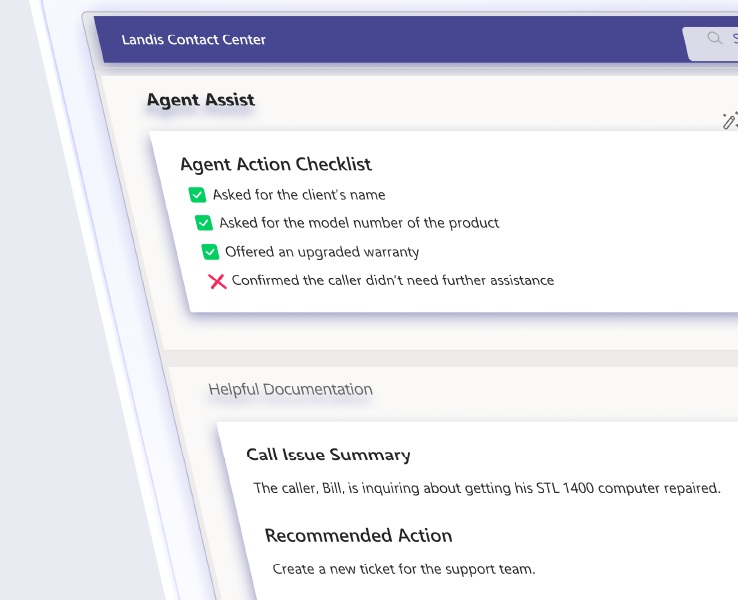
Agent assist listens to or reads the ongoing customer and agent interaction and offers a suite of tools to streamline the conversation. This can include surfacing relevant articles from a knowledge base, suggesting optimal responses, and providing step-by-step guidance to resolve customer issues. By having this information readily available, agents can significantly reduce the time spent searching for answers, leading to quicker resolutions and improved first-contact resolution rates.
Junction 13: Compliance and Call Recording
Policy-based compliance and call recording is not provided natively with Teams or the Queues App and requires a third-party solution. Many third-party contact centers offer this.
Junction 14: Seamless CRM integration
The Queues App provides basic screen pop capability. A browser app can be opened to a specific URL when an inbound PSTN call is answered. Third-party contact centers support more powerful CRM integrations, including the ability to display customer information before a call is answered and the ability to automate the capture and saving of call notes and follow-up actions to a customer’s file.
Junction 15: Automated After-Call Work.
For many organizations, wrap-up time is a critical component of call handling, allowing agents to complete necessary actions such as:
- Updating customer relationship management (CRM) records
- Sending follow-up emails
- Documenting call notes
- Consulting with a supervisor
The absence of this feature in the native Queues app means that agents may receive a new call before they have finished the necessary work from the previous interaction.
A Note about Call Summaries
Microsoft has integrated its call summaries into the Queues app via Teams Phone. This AI-powered feature enables agents to automatically capture notes, highlights, and any outstanding issues before transferring calls to their colleagues. However, organizations would need a Microsoft 365 Copilot license.
Even with Copilot-powered call summaries, the Queues App would not automate the capture and storage of call notes or follow-up actions to a customer’s file. Most third-party contact centers offer this capability.
Junction 16: Work force management (WFM)
Because labor is a significant cost, a work force management solution (WFM) can help with …
- Accurate Forecasting: Predicting future call volumes based on historical data to anticipate staffing needs.
- Efficient Scheduling: Creating optimized agent schedules that match predicted demand while accounting for breaks, lunches, and time off.
- Real-time Adherence: Monitoring whether agents are sticking to their schedules.
- Performance Analytics: In-depth reporting on key metrics to improve operational efficiency.
Note that a new application called Microsoft Shifts has been integrated directly with Teams. Shifts can create and manage basic work schedules for frontline workers, however it is not a contact center WFM tool. Shifts does not connect to call queue data for forecasting, calculate staffing requirements, or monitor real-time adherence for call center agents.
Junction 17: Quality Management (QM)
Quality Management (QM) is a systematic and continuous process designed to monitor, evaluate, and improve the quality of customer interactions and agent performance.
The Queues App provides several essential elements that form the foundation of a QM program for contact centers. It offers native features for monitoring and basic performance analytics. Its native capabilities do not typically include more advanced QM functionalities such as:
- Structured Agent Evaluation: The app lacks built-in tools for creating and using detailed evaluation forms to score agent interactions against specific criteria.
- Automated and AI-driven Insights: It does not offer advanced analytics like sentiment analysis or automated identification of compliance issues within call transcripts.
- Comprehensive Coaching Workflows: While real-time assistance is possible, the app does not have dedicated workflows for scheduling and tracking formal coaching sessions based on performance data.
Junction 18: More than 45 days of historical data?
While originally limited to 27 days of history, as of August 25, 2025, 45 days of historical reporting is now available (typically with a 30-minute latency). If you need more historical data, you will need to look beyond the Queues App.
Junction 19: Greater scale?
The Teams Queues app does not increase limits beyond 200 calls per queue and up to 200 agents per queue. Microsoft advises having no more than 100 call queues assigned per user, noting a hard limit of 200 call queues assigned per user. Organizations with high call volumes and complex routing needs may find these limits restrictive.
The Queues App Summary
The Microsoft Teams Queues App is a valuable tool for small to medium-sized businesses or internal helpdesks that primarily handle voice interactions and require basic call management capabilities within their existing Teams infrastructure. However, for organizations that prioritize a holistic and intelligent customer experience across multiple channels, demand deep analytical insights, and require sophisticated workforce management and integration capabilities, a dedicated, full-featured contact center solution remains the indispensable choice.
Business Class: Teams-Certified Contact Centers
Microsoft Teams-certified contact centers are third-party solutions that seamlessly integrate with Microsoft’s collaboration hub to transform it into a full-featured platform for managing customer interactions. These certified solutions extend the native calling and meeting capabilities of Teams, equipping businesses with the specialized tools required for a modern customer service environment.
These contact centers allow agents to handle customer inquiries from various channels, voice, email, chat, and social media, directly within the familiar Teams interface. The integration streamlines workflows and improves agent efficiency by eliminating the need to switch between different applications.
Microsoft offers different integration models for these contact center solutions: Connect, Extend, Unify. Each architecture provides varying levels of integration and functionality to suit different business needs. By leveraging a certified contact center, organizations can enhance their customer experience, boost agent productivity, and gain greater operational flexibility, all within the Microsoft Teams ecosystem.
As of April 2026, there are 29 Teams-certified contact center solutions, and four solutions currently in the certification process. Microsoft supports Contact Center solutions only from the certified partners. Microsoft may reject support cases where a noncertified Contact Center solution is used.
The Connect Model: A Waypoint versus an Endpoint?
A solution using the Connect architecture is not really a Teams contact center; but rather, a contact center that works with Teams.
A Microsoft Teams certified contact center utilizing the Connect integration model offers organizations a straightforward path to bridge their existing contact center infrastructure with the collaborative power of Microsoft Teams. This model essentially acts as a voice-centric bridge, enabling basic call routing and interaction between the two platforms. However, this simplicity comes with inherent limitations in terms of a truly unified agent experience and advanced functionality. A Connect contact center is not so much a Teams contact center; but rather, a contact center that works with Teams.
For organizations new to integrating their contact center with Microsoft Teams, or those with a strong reliance on an existing, contact center solution, the Connect model can serve as a valuable initial step. It provides a basic level of voice integration that can improve agent accessibility and leverage the collaborative strengths of Teams.
With the Connect model, the third-party contact center remains the “brain,” simply using Teams as a “softphone” for agents to make and receive calls. The agent works primarily in the third-party application, leading to a separate, less unified experience.
For businesses seeking a truly unified and seamless agent and customer experience, the limitations of the Connect model may quickly become apparent. In such cases, exploring the more deeply integrated Extend and Unify models, which offer a more native Teams experience with richer feature sets and more cohesive administrative control, would be the recommended path forward.
True Business Class
Both the Extend and Unify models provide deeply integrated, native experiences. The contact center is built within the Teams framework.
You can think of the Extend model as integrating a third-party contact center into the Teams interface, while the Unify model is a native contact center built with Microsoft’s own tools.
The Extend model integrates with the Microsoft Teams client via established Microsoft Graph Application Programming Interfaces (APIs), offering a mature and robust solution with a broad, well-established vendor ecosystem. It excels at providing a consistent user experience entirely within the familiar Teams interface. The Unify model, by contrast, is built on the same foundational communications platform as Teams itself—Azure Communication Services (ACS). This newer model represents Microsoft’s clear strategic direction, offering native integration with Microsoft’s telephony infrastructure and, most critically, its advanced Artificial Intelligence (AI) services in real time.
The journey towards an Extend or Unify contact center may involve switching tracks multiple times as you evaluate the strengths and limitations or each architecture.
Junction 20: Simplified Telephony
A major advantage of the Unify model from an IT management perspective is the simplification of telephony. Through Teams Phone Extensibility, organizations can use their existing Teams Phone numbers and carrier plans, through Microsoft Calling Plans, Operator Connect, or Direct Routing, for their contact center agents.
Junction 21: Team-Centric UI
The Extend model champions a universally standardized user experience. Every employee, whether a full-time agent or a back-office knowledge worker, uses the core Microsoft Teams interface. This approach might simplify training, IT support, and administration. This is a good fit for organizations where the lines between “contact center agent” and “general employee” are blurred, or for those aiming to establish a single, ubiquitous communications platform for all work.
The Unify model, in contrast, recognizes that the optimal interface for a full-time agent handling hundreds of interactions per day likely needs to be tailored to the role.
Junction 22: Improved AI Support
The Unify model’s architecture provides AI with near-zero latency. By building directly on Azure Communication Services (ACS), Unify solutions gain direct access to the raw media stream of a call. This allows for real-time processing by powerful services like Azure Cognitive Services and OpenAI without the delay inherent in API calls. This allows delivering low-latency live transcription and translation, live sentiment analysis, intelligent virtual agents, conversational IVR, and real-time agent.
Junction 23: Dual Persona Support
The Unify model allows an employee to have two distinct communication identities: their standard Microsoft Teams identity for internal collaboration and a separate CCaaS agent identity for handling customer interactions. An agent on a complex customer call will not be distracted by an incoming internal Teams call, and vice versa.
Junction 24: Predictable Costs
Because Unify solutions are built directly on Azure Communication Services (ACS), the usage of these underlying services incurs pay-as-you-go charges that are billed to the organization’s Azure subscription. This is a fundamental departure from a purely predictable per-seat subscription model provided by an Extend solution.
Junction 25: Time-to-Value
Being a newer model, the deployment process for Unify solutions is inherently less established across the market. The process will likely involve more Azure-centric configuration tasks, such as provisioning and securing the necessary Azure Communication Services resources.
Junction 26: Transfer tracking / Transfer to Voicemail / Chat with Teams User
Because the Azure Communication Services API continues to be developed, there are several surprising scenarios that are not currently supported for Unify contact centers:
- Ability to transfer a call to voicemail
- Ability to chat with a Teams user
- Tracking the transfer of a call between an agent and a Teams user
Further, Unify contact center calls are not recorded in the Teams Call Quality Detail (CQD) records. This means they are not reported using existing Teams reporting tools and that diagnosing any quality issues with Unify contact center calls will require a different process, and different tools, than for Teams calls.
Junction 27: Strategic Architecture
There is compelling evidence to suggest that the Unify model, built upon the foundations of Azure Communication Services (ACS) and Teams Phone Extensibility, represents Microsoft’s primary strategic focus for all future innovation in the integrated communications space.
While Unify represents the future, the Extend model will continue to be a strong, stable, and highly viable option for the foreseeable future. Its primary strengths are its maturity and the breadth of its ecosystem.
Extend versus Unify Summary
| Attribute | Extend Model | Unify Model |
|---|---|---|
| Core Architecture | Integrates with the Teams client as an embedded application. | Built on the same foundational platform as Teams. |
| Primary Technology | Microsoft Graph API, Cloud Communications API. | Azure Communication Services (ACS), Teams Phone Extensibility. |
| AI Integration & Performance | Mature AI features, well-suited for post-call analytics. Real-time AI is possible but may have API-induced latency. | Architecturally superior for real-time AI (live transcription, sentiment, agent assist) due to direct, low-latency media stream access. |
| Agent UI Flexibility | Primarily as a standardized experience within the Teams client, minimizing context switching. | Highly flexible; supports both a dedicated, purpose-built agent desktop and the standard Teams client for informal agents. |
| Key Feature | Deeply embedded, native-feeling experience for all users inside Microsoft Teams. | “Dual Persona” separates CCaaS and UCaaS identities, preventing interruptions and enabling role-tailored UIs. |
| Telephony Model | Uses Teams Phone, but may involve separate telephony management with the CCaaS vendor. | Fully unified telephony; uses existing Teams Phone numbers and plans (Direct Routing, Operator Connect) for both UCaaS and CCaaS. |
| Cost Structure | Predictable: Microsoft licenses + per-agent, per-month vendor subscription. | Hybrid: Microsoft licenses + vendor subscription + pay-as-you-go consumption charges for Azure Communication Services. |
| IT Management Overhead | Potentially higher due to managing separate telephony configurations and API integrations. | Lower due to a single, unified telephony platform and management interface (Teams Admin Center). |
| Ecosystem Maturity | Highly mature, with a large and diverse ecosystem of over 29 certified vendors. | Newer and emerging, with a smaller but growing list of certified launch partners. |
First-Party but Is It First-Class?
Microsoft Dynamics 365 Contact Center is a software platform for managing customer communications across various channels like phone, email, and chat. It uses artificial intelligence to provide agents with real-time assistance, such as conversation summaries and suggested responses, while chatbots and IVR handle common inquiries.
Key functions include intelligently routing customers to the best-suited agent and providing analytics on operational performance. The system also integrates with CRM platforms to give agents a unified view of customer history, helping to streamline service operations.
While Dynamics 365 Contact Center does not appear on the list of third-party “Teams Certified” contact centers, this is because it is Microsoft’s own first-party solution. Instead of undergoing a partner certification process, it features a deep, native integration with Microsoft Teams.
Dynamics 365 Contact Center is a newer entrant compared to established solutions. Dynamics 365 Contact Center is powerful but rated as complex. Deployment is not trivial and often requires expert knowledge of the Microsoft Power Platform, Dataverse, and Azure, in addition to the contact center application itself. The total cost of ownership can be high and difficult to predict.
Microsoft’s licensing structure is known for its complexity, and the Contact Center is no exception, multiple licenses are typically required and certain services can incur additional consumption-based charges through Azure Communication Services.
Larger organizations (1,000+ agents) may want to consider Dynamics 365 Contact Center when its primary goal is deep platform unification and data consolidation within a single ecosystem. This would most likely be businesses already heavily invested in Microsoft Dynamics 365 for their CRM and the Power Platform for automation.
Arriving at Your Destination
Given the variety of choices, matching a contact center solution type to your organizational needs can be complicated.
While this guide does not purport to evaluate all the necessary considerations and decision points, we hope that the information provided helps make your contact center journey more comfortable and effective.
Interactive Contact Center Selector
Support for this Guide
Landis Technologies commissioned EnableUC to develop this guide to help organizations better understand and select an appropriate call handling or contact center solution.
We greatly appreciate Landis’s support in sponsoring this effort and we align with their vision which seeks to deliver “More organizations and people using life-friendly technology.”
About the Author
Kevin is a globally recognized Unified Communications, Collaboration, AI, and technology thought-leader, strategist, and implementation leader. He was recently honored as the top UC Today UC All-Star.
Kevin is part analyst and part consultant, which ensures he understand both the “big picture” and the real-world realities.
He has led the development of many technology strategies for medium and large organizations and managed the deployment of hundreds of thousands of Microsoft calling and collaboration seats.
A long time ago he created an award-winning game for the Commodore 64 and ever since has been focused on using technology creatively to deliver effective value.

About Landis Technologies
Managing customer interactions shouldn’t be complicated.
Landis Contact Center gives you the visibility, smart routing, and seamless Teams integration you need to deliver the best customer experience. Boost your agent performance and improve customer satisfaction—without the hassle of complex systems.
What sets Landis apart is their unique “2-engine model” that bridges present needs with future capabilities.
- Extend Model (Mature & Available Today): Our proven, Microsoft Teams-certified solution delivers full-featured contact center capabilities now. This offers complete Avaya and Cisco replacement functionality with enterprise-grade reliability.
- Unify Model (Future-Ready): Advanced AI capabilities and intelligent virtual agents that represent the next evolution of customer service, available as organizations are ready to adopt them.
Both integrations, or “engines,” can be used to power the same contact center, or even just a part of it, whatever is best suited to each scenario.