Data Integration for Microsoft Teams
Landis Contact Center agents can see the caller’s CRM record before they answer, update it during the call, and save information back to the customer record without leaving Microsoft Teams.









What a CRM Integration Does

Screen pop
Agents can see the call pop with caller info even before answering and can decline a call that isn’t theirs.

Call logging
Agents record notes or make changes from within Contact Center and they save to the customer record.

CRM based routing
An IVR can query the CRM and route the call using information like account tier, open case, service status, or anything else in the CRM.
What Agents See in the Call Pop
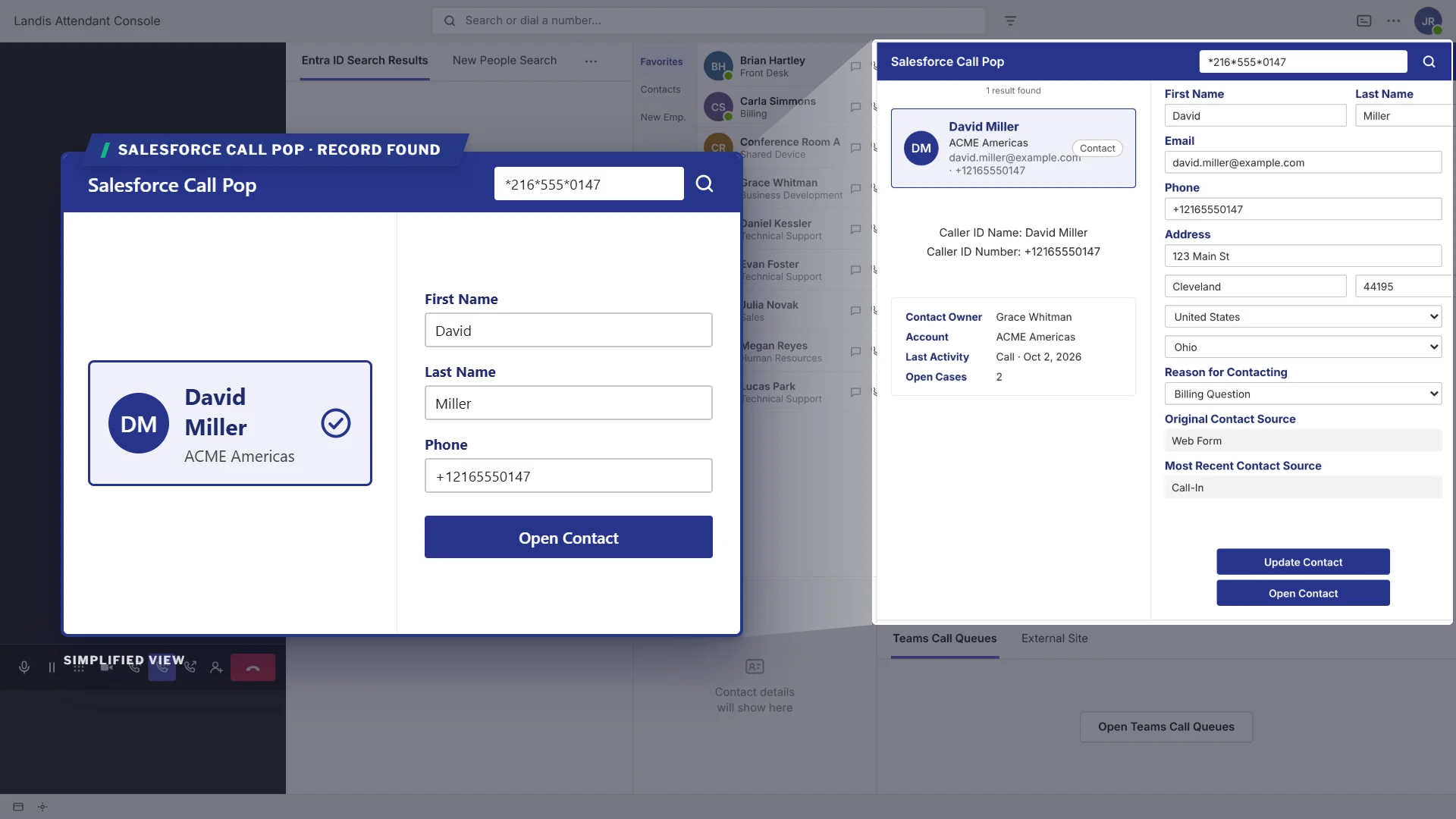
The caller’s record appears before the agent answers.
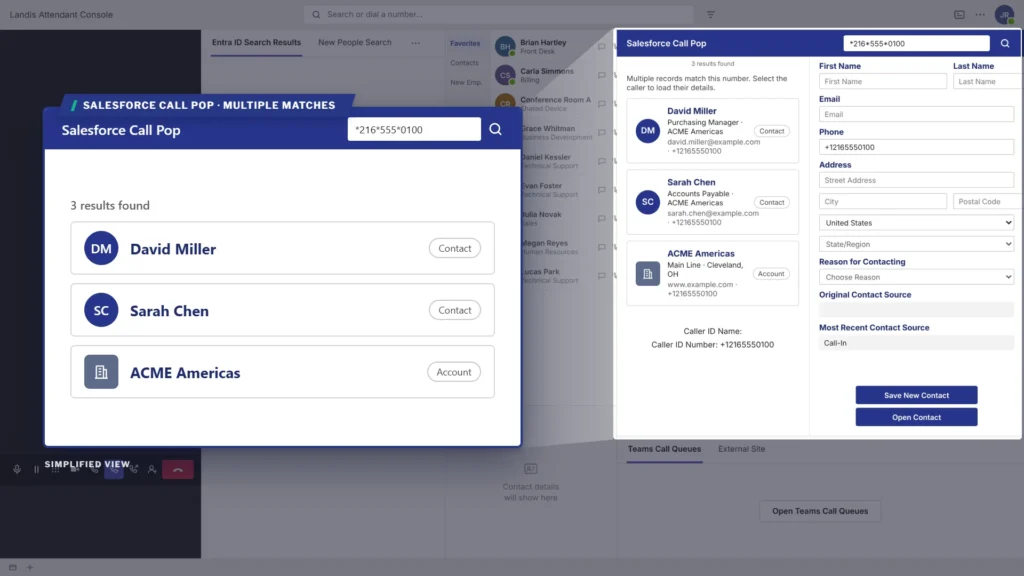
When a number matches more than one record, each is listed.
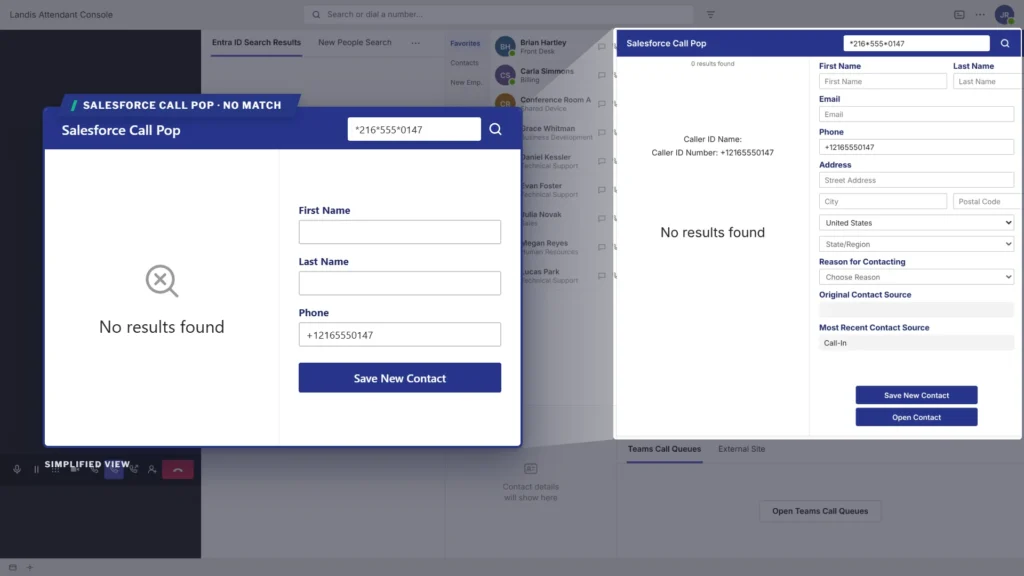
If nothing matches, the agent can create a new record from the call pop.
Each field is set as editable or display-only when the pop is built. Saving writes directly to the CRM and the call pop also stays open after the call ends to allow for after-call -work.
Three Ways to Get a Call Pop
Landis builds it
A Landis engineer builds a call pop for your CRM, fields, and workflow.
Import a power app
Your team starts from a pre-made call pop. Import it into your Power Platform environment, connect it to their CRM, choose the fields, and publish.
Build it from scratch
Your IT team or Microsoft partner builds the app using the Landis call parameters and documentation.



Ways to Connect a CRM to Landis
How it Connects
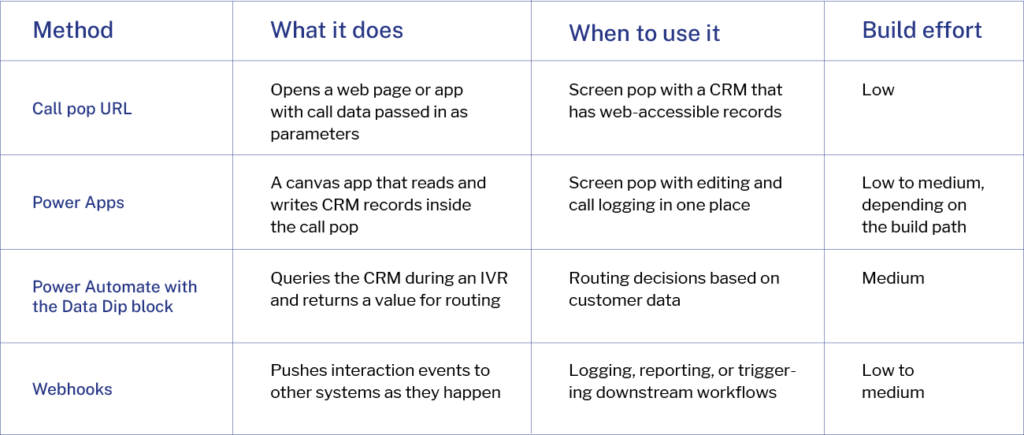
CRM integrations can combine more than one. A Salesforce build might combine a Power Apps call pop with a data dip in the IVR and webhooks feeding a reporting dashboard.
A Landis engineer can walk through which method fits your CRM and environment.
How the CRM Integration Works
Technical Details
What data Landis Contact Center sends
Call pop is configured per queue, under the queue’s Integrations tab. Supply the app’s URL and pass call data to it as parameters. Typing an open brace in the URL field opens a picker of the available parameters.
Parameter
{callernumber}
{callername}
{callerupn}
{calleradid}
{callersearch}
{queuename}
{scenarioid}
{datavalue01} through {datavalue20}
Meaning
The caller’s phone number
The caller’s name
The caller’s user principal name
The caller’s Entra ID
The first available of the three above
The queue that took the call
The unique interaction ID
Values collected in the IVR
What data Landis Attendant Console sends
Attendant Console has its own call pop which can be set up in caller info settings. The lookup URL opens in a panel or a new tab, and supports these placeholders.
Parameter
{callernumber}
{displayname}
{queuename}
{callid}
Meaning
The caller’s phone number
The caller’s display name
The queue the call arrived through
The call identifier
When Contact Center and Attendant Console are connected, a Contact Center queue’s call pop shows in Attendant Console with no extra set up.
Where the app runs
A call pop is a web application, so it runs where the agent works: Contact Center in the browser, Contact Center in Teams, the Premier Agent Panel, and Attendant Console.
How the record is matched
Landis passes the inbound number to the app as a parameter. The app queries the CRM’s API for a matching record and displays the fields the team configured. When the app includes manual search, agents can clear the number and search by other details such as name or email.
How edits are saved
Saving posts to the CRM’s API then re-reads the record and displays the stored values. Agents see what the CRM currently holds rather than what was typed. New records are created the same way with the caller’s phone number filled in from the call.
Authentication
Authentication depends on the CRM connector. Some use a shared integration account, some use each agent’s own sign-in, and some use an access token. Each CRM page covers the connector options.
Querying a CRM during a call
The data dip block in the IVR designer sends an HTTP POST to an external API and stores the response as a variable which can be used for routing, a data collection field, or passed to the call pop. The block times out at 30 seconds and supports a fallback path.
Pushing events to other systems
Contact Center webhooks send HTTP POST notifications for queue interactions, IVR interactions, agent activity, agent details, and recordings with the full call record data in the payload. Custom headers are also supported, and can be configured under Administration, then Webhooks. Attendant Console offers an end-of-call webhook.
Custom and In-house Systems
Landis does not require a CRM to be on a supported list.
- A call pop opens any URL it is pointed at and passes call data as parameters.
- A data dip posts to any API endpoint that accepts HTTP.
- Webhooks deliver to any listener configured.
A homegrown or industry-specific system connects the same way a commercial CRM does.
What You Need
Prerequisites
1
Landis
Call pop, webhooks, and the Data Dip block are included in Landis Contact Center. Call pop, adaptive cards, and the end-of-call webhook are included in Landis Attendant Console. There is no separate integration license or higher tier to buy.
2
Your CRM
API access for anything beyond a read-only screen pop. Requirements differ by CRM and edition.
3
Microsoft Power Platform
Power Apps or Power Automate licensing where those methods are used. Most CRM connectors are premium and are not covered by Microsoft 365 seeded rights.
4
People
Landis can build the call pop, your team can import a basic Power App, or you can build it from scratch.
Documentation
Landis documentation covers call pop configuration, the full parameter list, the Data Dip block, and webhook setup.
Contact Center
Attendant Console
CRM Integration FAQs
Which CRMs does Landis integrate with?
Landis connects to any CRM or service desk with a web interface or an API. Salesforce, HubSpot, Halo, Microsoft Dynamics 365, and ServiceNow are common, and homegrown systems connect the same way. The CRM pages above cover setup for each.
Is this a CTI integration?
It does what a CTI integration does, showing the caller’s record and logging the call, but it is built differently. Landis passes call data to a web application rather than installing a telephony adapter inside the CRM.
Do we have to build the integration ourselves?
No. Landis can build the call pop. The organization’s team can also import a basic Power App and connect it to their CRM, or build the app from scratch using the Landis call parameters.
Does the screen pop appear before the agent answers?
Yes. Agents can review the record and decline the call from the pop.
Can agents edit CRM data from the call pop, or only view it?
Both. Each field is set as editable or display-only when the app is built.
Can agents finish their notes after the customer hangs up?
Yes. The pop can be built to stay open until wrap-up is complete.
Does this work with Landis Attendant Console?
Yes. Attendant Console has its own call pop with its own placeholders. When Contact Center and Attendant Console are connected, a Contact Center queue’s call pop shows in Attendant Console with no extra setup.
Can we skip the interactive app and just display CRM data?
Yes. An adaptive card can show call details and read-only information without the editing and write-back of a full Power Apps build.
Can our CRM data drive call routing?
Yes, in Landis Contact Center. The Data Dip block queries the CRM during the IVR and stores the result as a variable. Calls can route on account tier, open case status, or any other value the CRM returns.
How long does a CRM integration take to build?
A basic screen pop typically takes one to three days. A full build with write-back and error handling runs closer to two to four weeks, depending on how many objects and fields are involved.
What happens if the CRM is unreachable during a call?
That depends on how the app handles errors. A good build shows the agent a clear message instead of a blank panel, lets them continue the call, and logs the interaction once the CRM is reachable again.
Does Landis store our CRM data?
No. The call pop queries the CRM directly and displays the result. Landis passes call parameters to it and does not hold the CRM records.
Book a CRM integration demo
A Landis engineer can walk through the integration options for your CRM and answer setup questions.