For decades, call center CRM integration meant CTI middleware, vendor coordination, and 3-6 month implementations costing $200K-$500K+. Teams-native contact centers have simplified this.
For Teams-first organizations, call center CRM integration doesn’t require CTI middleware or vendor-managed API integrations, since Teams-native contact centers can use Power Platform to connect directly to CRM systems.
Table of contents
- How Teams-Native Architecture Changes Call Center CRM Integration
- Traditional Call Center CRM Integration Methods
- Integration Approach Comparison
- CRM Platform Integration
- Security and Compliance
- How Landis Implements Teams-Native Integration
- When to Choose Each Approach
- Frequently Asked Questions
- Making the Right Decision
Multitasking? Listen while you work!
How Teams-Native Architecture Changes Call Center CRM Integration
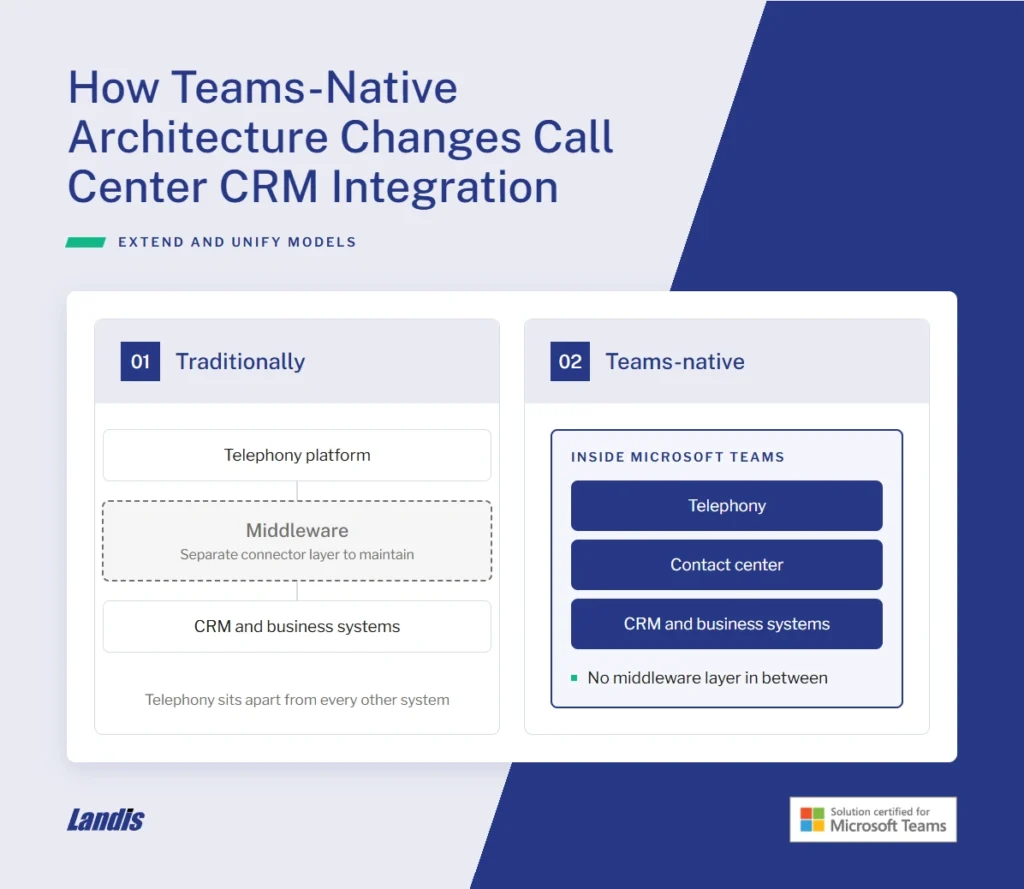
Teams-native contact centers built on Microsoft’s Extend or Unify models operate entirely within Microsoft Teams, eliminating the separation between telephony and other business systems that have traditionally required middleware to connect.
Three architectural advantages of Teams Contact Centers for CRM Integration
Unified authentication: Azure Active Directory handles all system access. Agents authenticate once for Teams, contact center, and CRM.
Native data connections: Power Platform’s 900+ pre-built connectors handle call center CRM integration through visual workflows rather than custom API coding or CTI middleware.
Integrated automation: Power Automate manages call events directly within the Microsoft ecosystem. Screen pops, automatic logging, and case creation happen through the same workflow platform organizations already use.
Traditional Call Center CRM Integration Methods
CTI Middleware: The Legacy Approach
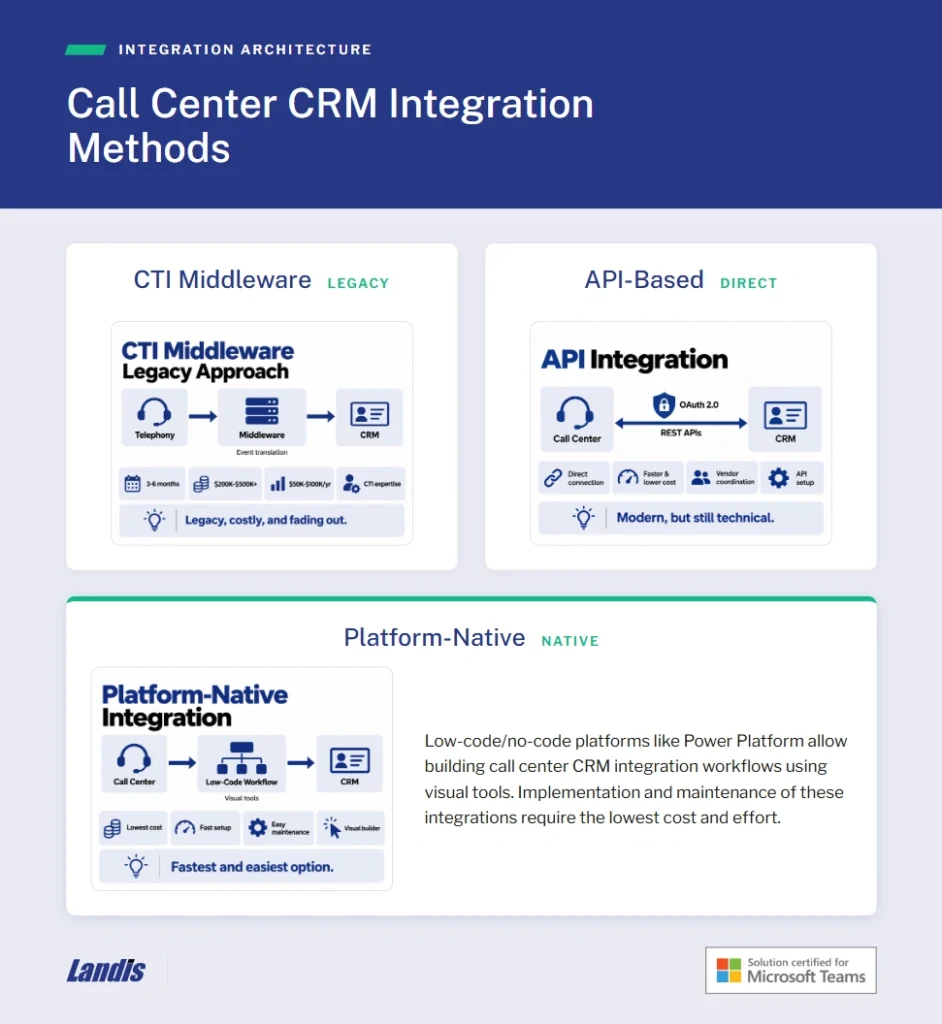
CTI middleware servers sit between telephony platforms and CRM systems, translating phone events into computer-readable data. Enterprise call center CRM integration deployments using middleware typically require 3-6 months, cost $200K-$500K+ initially, with annual maintenance of $50K-$100K. Organizations need specialized CTI expertise that’s increasingly scarce.
Cloud-native architectures have made middleware obsolete for most new call center CRM integration projects.
API-Based CRM Integration
API-based call center CRM integration connects platforms directly through REST APIs. OAuth 2.0 handles authentication. Implementation is typically faster and less expensive versus middleware but still requires vendor coordination and API configuration.
Platform-Native CRM Integration
Low-code/no-code platforms like Power Platform allow building call center CRM integration workflows using visual tools. Implementation and maintenance of these integrations require the lowest cost and effort.
Integration Approach Comparison
This chart generally compares the three different approaches as would be likely for an enterprise-level implementation.
| Factor | CTI Middleware | API Integration | Teams-Native |
| Timeline | 3-6 months | 2-6 weeks | 1-3 days (basic), 2-4 weeks (full) |
| Initial Cost | $200K-$500K+ | $50K-$150K | Included with Teams |
| Annual Maintenance | $50K-$100K | $20K-$40K | 2-4 hours monthly |
| Expertise Required | CTI specialists | API configuration | Power Platform familiarity |
| 5-Year TCO | $450K-$750K | $150K-$350K | $25K-$75K |
CRM Platform Integration
Microsoft Dynamics 365: Fastest integration through native Power Platform connectors.
Salesforce: Power Platform connectors to Salesforce REST API provide Teams-native integration. Most mature third-party ecosystem with 200+ contact center apps on AppExchange.
HubSpot: Simple REST API for comprehensive Teams-native call center CRM integration. Free CRM tier attractive for small businesses.
ServiceNow: REST API-based framework enables screen pops and automatic logging. Best for IT helpdesk operations.
Custom CRMs: Power Platform custom connectors allow visual configuration matching specific data models for call center CRM integration.
Security and Compliance
Modern call center CRM integration requires OAuth 2.0 authentication (RFC 9700, January 2025), TLS 1.3 for data in transit, and AES-256 encryption at rest.
Industry-specific compliance:
- PCI-DSS: Firewall-protected environments required. DTMF masking provides highest security.
- GDPR: 72-hour breach notification required. Azure compliance tools simplify adherence.
- HIPAA: Business Associate Agreements required. Microsoft provides BAAs for Azure services.
Teams-native solutions leverage Azure infrastructure supporting 99.99% minimum uptime with unified security framework.
How Landis Implements Teams-Native Integration
Landis Contact Center for Microsoft Teams eliminates middleware through Teams-native architecture using Microsoft APIs.
What Landis provides:
- Call pop capability
- Webhook endpoints for call events
- Power Automate triggers for workflow automation
- Teams-native calling foundation
What organizations configure:
- PowerApp for screen pop displaying CRM data
- Power Automate flows for automatic call logging
- Custom workflows for case/ticket creation
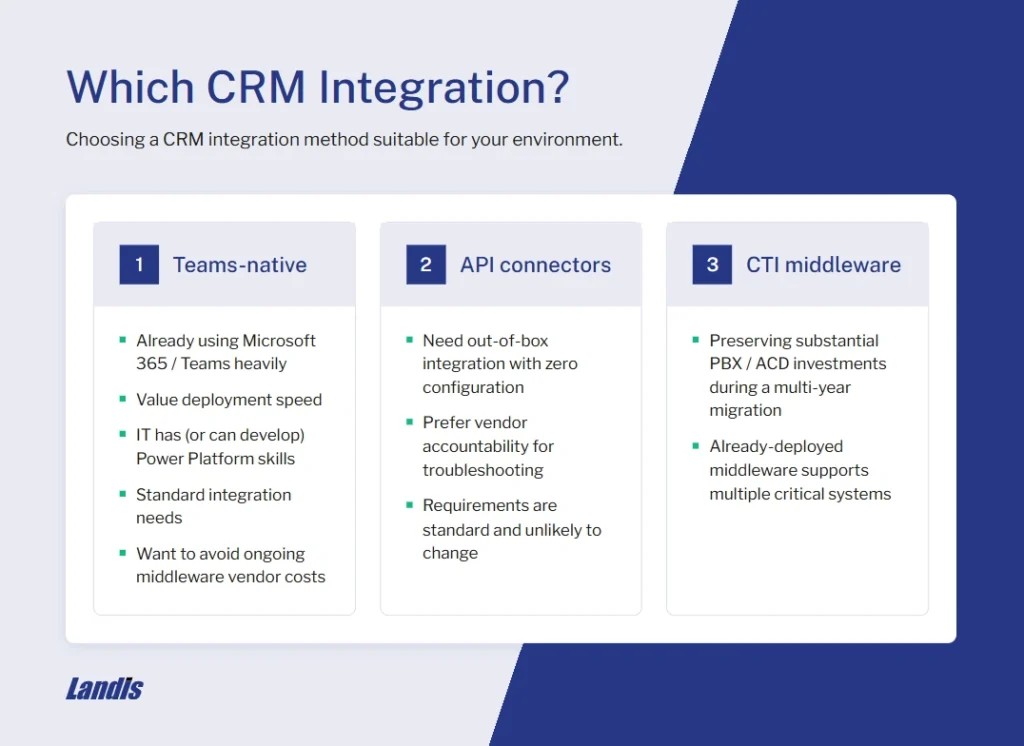
When to Choose Each Approach
Choose Teams-native call center CRM integration if:
- Already using Microsoft 365/Teams heavily
- Value deployment speed
- IT team has (or can develop) Power Platform skills
- CRM integration needs are standard (screen pops, logging, click-to-dial)
- Want to avoid ongoing middleware vendor costs
Choose vendor-managed API connectors if:
- Need out-of-box integration with zero configuration
- Prefer vendor accountability for troubleshooting
- Integration requirements are standard and unlikely to change
Choose CTI middleware only if:
- Preserving substantial PBX/ACD investments during multi-year migration
- Already-deployed middleware supports multiple critical systems
Frequently Asked Questions
Teams-native operates entirely within Microsoft ecosystem using Power Platform connectors and Azure AD authentication. Traditional approaches require separate middleware servers and vendor coordination.
Power Platform provides hundreds of connectors including Dynamics 365, Salesforce, HubSpot, ServiceNow, Zoho, and custom systems with REST APIs.
Limited coding required, but Power Platform familiarity needed.
Teams-native call center CRM integration typically requires only a few hours monthly for comprehensive implementations. Middleware approaches require significantly higher maintenance coordinating vendor updates and managing dedicated infrastructure.
Making the Right Decision
Landis Contact Center for Microsoft Teams provides enterprise-grade contact center capabilities with Power Platform integration hooks, delivering rapid deployment that eliminates middleware complexity.