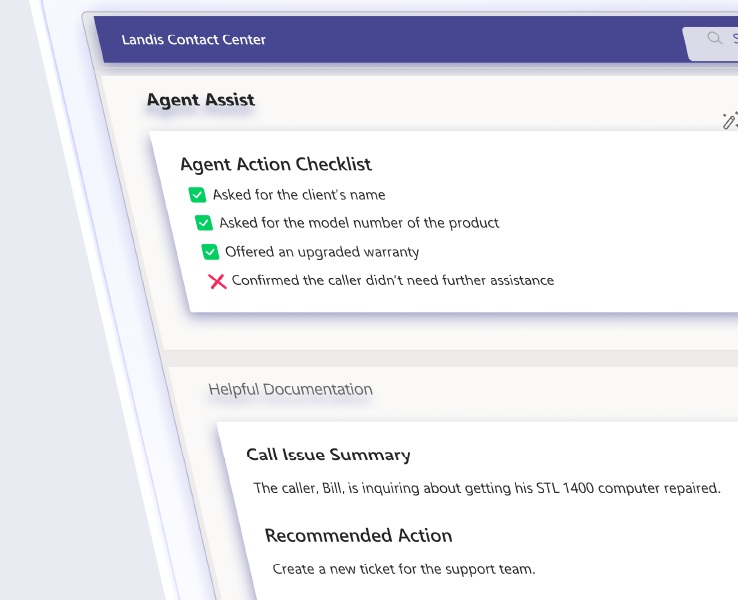
When agents start calls blind, customers get frustrated and agents feel unprepared. Call center screen pop changes this by displaying caller info or any other relevant information instantly. This simple shift turns uncertain interactions into confident problem-solving.
Table of contents
What Call Center Screen Pop Technology Does
Screen pop automatically displays relevant caller information on an agent’s screen the moment a call arrives, before the conversation begins. This information can be retrieved from a call center CRM integration or information that the call has collected as it moved through the system to the agent. It could include name, phone number, call history, account status, or contextual notes.
7 Ways Screen Pop Builds Agent Confidence and Improves Customer Interactions
1. Instant Recognition: “Good morning, Mr. Johnson, how can I help you today?”
Personal recognition immediately establishes rapport and demonstrates competence. Instead of generic greetings, agents provide personalized acknowledgment.
2. Call History Context: “I see you called Housing yesterday. Have you been assisted well?”
Contextual awareness prevents customers from repeating their stories and shows continuity throughout the business. Agents equipped with call history can pick up where previous interactions left off and create a seamless experience across multiple calls.
3. Proactive Service Recovery: “You were promised a callback by 3 PM yesterday. I apologize for the delay.”
Screen pop enables agents to identify service failures before customers mention them. This proactive approach resolves immediate issues while demonstrating organizational accountability and attention to customer commitments.
4. Cross-Department Intelligence: “It looks like you’ve called Financial Aid, Admissions, and Registration this week. Is that all coordinated?”
Visibility across departmental silos allows agents to identify potential coordination issues. This particularly benefits complex organizations like universities where students interact with multiple departments for related needs.
5. Anticipatory Support: “Your scholarship renewal is due next week. I can help you with that now if you like.”
Predictive service based on account status, previous interactions, or calendar information turns reactive support into proactive assistance. Agents can identify upcoming needs and address them preemptively, which could reduce future call volume.
6. Priority Handling: Automatic VIP Recognition for Board Members, Major Donors, etc.
High-value customers should get priority treatment automatically without manual sorting or delays. Screen pop systems can flag VIP status, alerting agents to adjust their approach or escalation procedures accordingly.
7. AI-Enhanced Insights: Reverse Phone Lookup and Intelligent Data Analysis
Advanced screen pop systems can use AI to provide additional context through things like reverse phone number lookup, sentiment analysis from previous interactions, and intelligent routing suggestions.
Landis Attendant Console uses adaptive cards to present customizable information displays that can also be enhanced with AI prompts.
Advanced Screen Pop Features That Eliminate Agent Guesswork
Modern screen pop abilities go beyond basic caller identification to give agents better support. Landis Attendant Console and Contact Center do this in a few ways.
Contact Center CRM Integration
When Contact Center is integrated with a CRM, agents can have complete customer context including account status, service history, billing information, and interaction logs.
Attendant Console Adaptive Cards
Landis Attendant Console can display adaptive cards as the call arrives. These customizable information displays can be configured to show the most relevant data that is picked up by the call as it goes through the system. Information might include caller number, time spent in the queue or on hold, or even AI responses to prompts run on this information, such as reverse number look-up.
Further, when Attendant Console and Contact Center are both used and connected, any CRM data can be displayed here.
Frequently Asked Questions About Call Center Screen Pop
Screen pop is a call center feature that automatically displays relevant caller information on an agent’s screen the moment a call arrives, before the conversation even begins. It’s powered by computer telephony integration which connects your phone system to other tools like a CRM. The result is that agents know who’s calling and why before they say hello.
It depends on what your system is integrated with and what data has been collected. Common examples include the caller’s name, phone number, account status, call history, and open support tickets. More advanced setups can surface IVR inputs, time spent in queue, or even AI-generated insights like reverse phone lookup.
When a call comes in, the system captures an identifier, which is usually the caller’s phone number, and uses it to query your CRM or other databases. That matched data is then “popped” onto the agent’s screen, often before the call is even answered. Ideally, the whole process takes seconds.
Not always. Basic screen pops can display information collected during the call itself, like what a caller entered in an IVR menu. But a CRM integration unlocks more value such as complete account history, past interactions, service records, and more. The richer your CRM data, the more useful the screen pop.
Customers don’t have to re-explain their situation every time they call. Agents already have context, can greet callers by name, and can address issues without the usual question routine.
Yes. By eliminating the time agents spend asking for basic information and manually searching records, screen pop can shave meaningful time off each call. For high-volume contact centers, that adds up quickly across hundreds of daily interactions.
Yes. When a contact center has visibility across departments, agents can see if a caller has recently contacted other teams, flag potential coordination gaps, and provide a more connected experience. This is especially useful for organizations like universities or healthcare systems where callers often interact with multiple departments.
Caller ID just shows the phone number (and sometimes name) of who’s calling. Screen pop surfaces much more information such as full customer profiles, interaction history, account details, and contextual data pulled from integrated systems.
Give Agents the Confidence They Need
Modern solutions like Landis Contact Center for Microsoft Teams provide the reliability, integration capabilities, and advanced features needed to improve customer service inside the familiar Teams environment.
Book a demo of Landis Attendant Console to see these features and more.