Every abandoned call report in the contact center is frustrating, but behind that is an even more frustrated caller who has a growing dissatisfaction with your business. In this post, we’ll look at some tips for reducing call abandonment.
Table of Contents
What is Call Abandonment Rate?
Call abandonment rate measures the percentage of callers who hang up before speaking to an agent.
Call Abandonment Rate = (Abandoned Calls ÷ Total Calls) × 100
Although rates vary by industry, acceptable call abandonment rate standard benchmarks show that healthy rates typically fall between 2-5%, and many averages are between 5-8%. Call abandonment rates above 8% need attention.
What counts as an abandoned call?
An abandoned call is when a caller hangs up before speaking with a live agent. Usually “short abandons” occurring within the first 10-20 seconds are excluded since these are often misdials or wrong numbers rather than frustrated customers.
Why do callers abandon calls?
Six of the most common reasons customers abandon calls are:
- Unclear wait times
- No callback option
- Long wait times
- Confusing menus
- Poor call routing
- Lack of self-service options
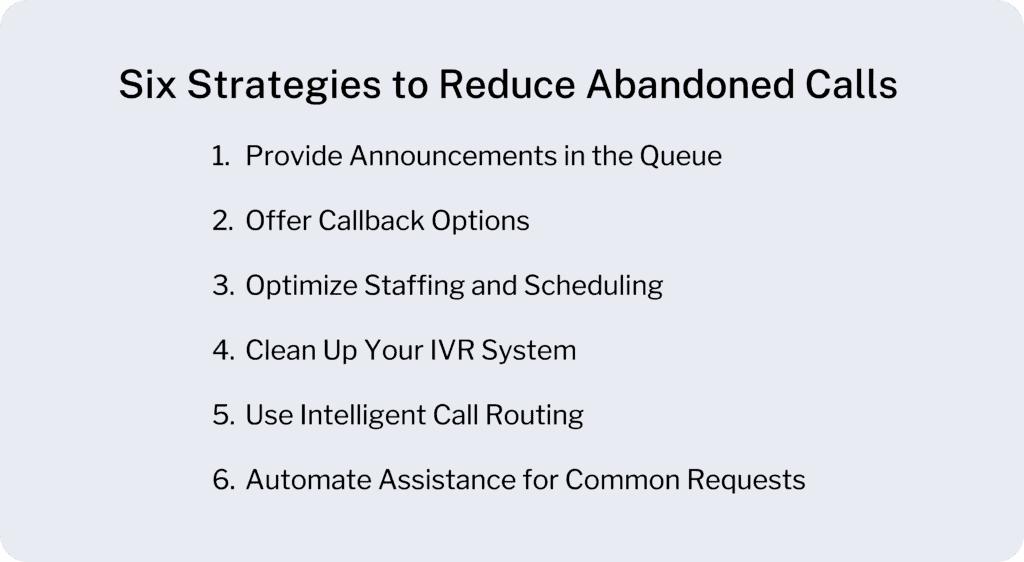
Below, we’ll look at six tips for reducing call abandonment that address each of these caller pain points.
How Can Contact Centers Reduce Call Abandonment?
1. Provide Announcements in the Queue
Caller pain point: Long, unexplained hold times and uncertainty about the remaining hold time.
Solutions
- Position in queue announcements telling callers their place in line or the number of callers ahead of them.
- Wait time estimates providing an expectation of the remaining time until the next agent is available.
- Hold messages keeping callers engaged. Share helpful information, company updates, or self-service options.
2. Offer Callback Options
Caller pain point: The caller’s own productivity is put on hold while being stuck in a queue.
Solutions
- Callback requests let callers opt out of holding without losing their place. When an agent becomes available, they can call them back.
- Proactive follow-up for abandoned calls using real-time notifications. When calls are abandoned after a certain threshold, agents receive a notification and can immediately call back to resolve the issue.
3. Optimize Staffing and Scheduling
Caller pain point: Long wait times and possibly being transferred again after waiting.
Solutions
- Historical data analysis for forecasting reveals patterns in call volume. Track when your busiest periods occur – Monday mornings, end-of-semester periods, or specific times of day, and use this data to schedule accordingly.
- Cross-training for flexibility enables agents to handle multiple types of inquiries. When call volume spikes in one area, you can redirect qualified agents from other departments rather than watching abandonment rates climb.
- Real-time workforce management to respond to unexpected changes. Monitor your queues throughout the day and make staffing changes as needed.
4. Clean Up Your IVR System
Caller pain point: Confusing IVR menus
Solutions
- Simplify menu options to 3-4 choices maximum per level. Too many options create decision paralysis.
- Easy path to human agents should always be available. Don’t force callers through multiple menu levels just to reach a person.
5. Use Intelligent Call Routing
Caller pain point: Calls reaching wrong agents or departments
Solutions
- Skills-based routing matches callers with agents who have the right expertise.
- Priority queues for VIP customers give special treatment to high-value accounts or urgent situations.
- Overflow management tactics handle volume spikes gracefully. When your primary queue fills up, route calls to backup agents, other departments, or callback queues rather than letting calls time out and become unanswered.
6. Automate Assistance for Common Requests
Customer pain point: No self-service options.
Solutions
- Self-service voice menus use AI to handle routine inquiries automatically. Let callers check account balances, payment due dates, or basic information without agent involvement.
- Automated status updates provide instant access to common information like enrollment status, financial aid disbursement dates, or account holds.
- Integration with existing systems makes automation more powerful. When your IVR can pull data an integrated CRM or other system, callers get accurate, up-to-date information instantly.
Frequently Asked Questions About Call Abandonment
Most industry benchmarks put a healthy call abandonment rate between 2–5%, with many centers averaging in the 5–8% range. Rates above 8% sustained year-round are a clear signal that something needs immediate attention. High-performing AI-assisted contact centers are pushing rates as low as 2%, though that’s an ambitious target for most operations.
It depends on the context, but patience runs out faster than most managers assume. A Call Centre Helper survey found that abandonment spikes vary by industry, with 19% of respondents seeing a spike at 30–59 seconds, and 15% seeing one after 4+ minutes, suggesting that many callers are willing to wait, but that tolerance is far from universal. An important variable here is whether callers know how long they’ll be waiting, since uncertainty tends to shorten patience.
Yes, and significantly. Research shows that 75% of adults in the U.S. prefer callbacks to waiting on hold, and many of the most successful call centers have implemented this feature specifically to reduce abandonment rates. A callback option removes the frustration of being stuck because callers can keep their place in queue without being tied to the phone.
A poorly designed IVR is one of the fastest ways to push callers out of the queue. If callers don’t know how long they’ll be waiting, or if they’re unsure that they’re in the right place, they’re more likely to hang up. Keeping menu options limited, providing clear routing, and always offering an easy path to a live agent are the most critical IVR fixes for reducing abandonment.
Yes, and it works upstream, not just in the queue. Self-service options reduce call queues by letting callers handle straightforward tasks on their own, meaning those who truly need an agent get through faster. Recent studies indicate that 67% of consumers actually prefer self-service to speaking with a customer service representative, so offering it well serves both customer preference and operational efficiency.
The impact stretches well past the queue metrics. High abandonment rates mean frustrated customers who often tell their friends, write reviews, and switch to competitors. Persistent abandonment also tends to reveal deeper problems like understaffing, flawed call routing, or gaps in self-service that push more volume to the phones than necessary.
Reduce Call Abandonment with Landis Contact Center
Landis offers several unique features to help with tracking and reducing call abandonment.
Granular abandoned call reports provide detailed insights into individual caller behavior, hold times, and patterns to distinguish between repeat callers and one-time issues.
Time-based analytics report on queue calls by hour to identify peak abandonment periods.
Abandoned call alerts through webhook notifications can send an instant notification when calls are abandoned after specific thresholds.
All of these strategies become much easier to implement when you have the right platform supporting them. Landis Contact Center for Microsoft Teams brings every abandonment-fighting feature directly into the interface your agents already know and trust.
Ready to see these strategies in action? Book a demo of Landis Contact Center and discover how to turn your challenges into advantages.