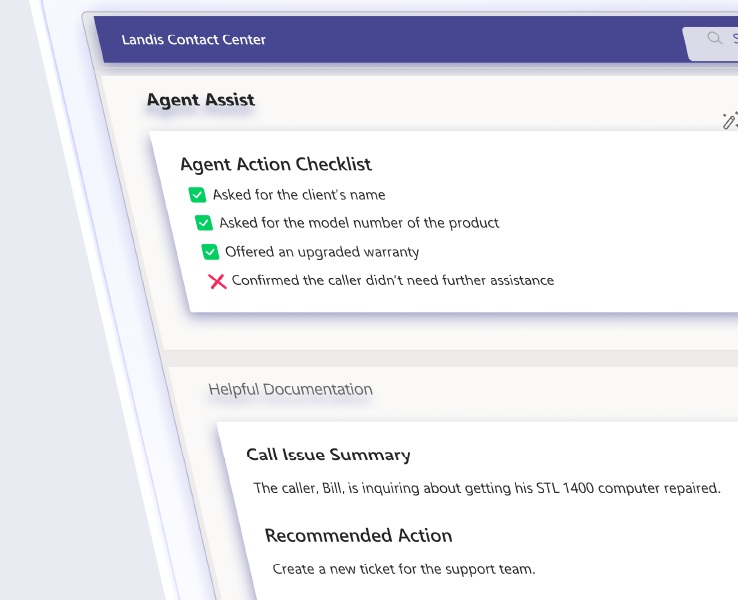
Is your contact center delivering the experience your customers deserve? Good call quality monitoring separates frustrated callers from satisfied customers.
Poor call quality directly impacts business:
- Lost revenue from abandoned transactions
- Higher costs from repeat calls and escalations
- Reputation damage from negative customer experiences
- Security risks from undocumented interactions
Table of contents
5 Essential Call Quality Monitoring Best Practices
1. Define Clear Standards for Success
The Problem: Without measurable benchmarks, how do you know if your agents are providing consistent service across departments?
The Solution: Track these call quality monitoring metrics:
- First Call Resolution (FCR): Customers shouldn’t need to call multiple times for the same issue
- Average Handling Time (AHT): Balance efficiency with quality service
- Customer Satisfaction (CSAT): Direct feedback from your callers
2. Use Real-Time Monitoring Systems
The Problem: During busy periods, problems can quickly get out of hand without quick action.
The Solution: Real-time monitoring allows supervisors to:
- Notice surges in call volume and move resources right away
- Spot escalating situations that need help
- Keep quality high even during busy periods
3. Deliver Data-Driven Feedback
The Problem: General feedback doesn’t help your agents improve, and patterns of issues go unnoticed.
The Solution: Structured call quality monitoring feedback based on actual call data:
- Review recorded calls with agents to show specific examples
- Pair observations with objective call quality metrics
- Focus on growth rather than criticism
- Schedule team training for common issues
Quick Tip: Use call recordings and transcripts to create targeted training materials addressing frequent customer questions. Learn more in our guide to improving call center quality assurance.
4. Use Advanced Monitoring Tools with Sentiment Analysis
The Problem: It’s difficult to identify which types of calls consistently leave customers frustrated.
The Solution: AI-powered call quality monitoring through sentiment analysis provides insights by:
- Identifying emotional patterns in conversations
- Alerting supervisors to frustrated callers in real time
- Providing trends to inform process improvements
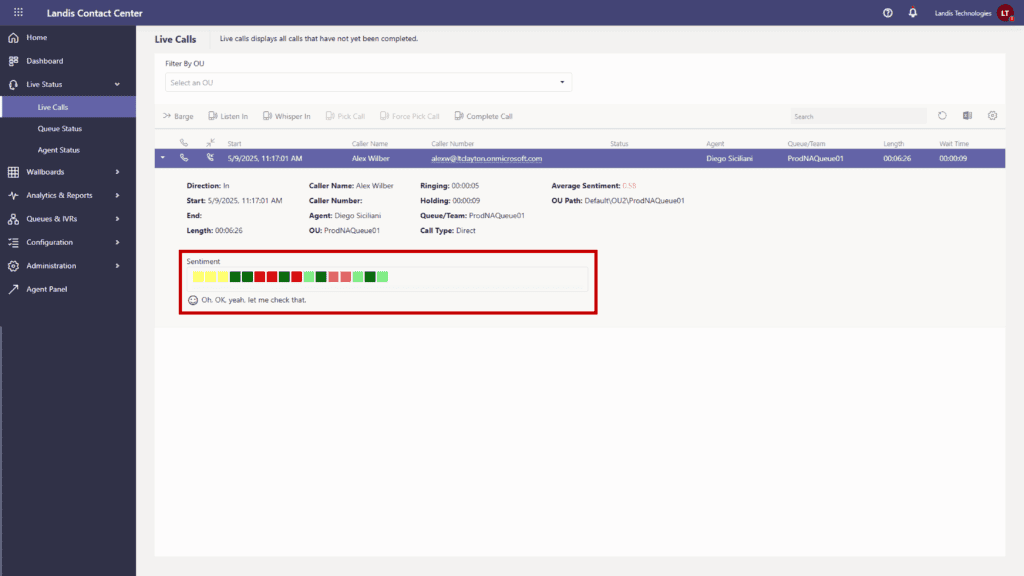
Quick Tip: Landis Contact Center’s sentiment analysis can help identify specific frustration points in financial aid or billing calls that might not be obvious in traditional metrics.
5. Use Call Data to Optimize Call Queues
The Problem: Long wait times during busy periods harm customer satisfaction and raise abandonment rates.
The Solution: Data-driven monitoring for queue management:
- Study patterns to find predictable busy periods
- Match staffing to expected demand
- Simplify scripts for common questions
- Give priority to urgent calls like IT problems or key clients
Quick Tip: Use data from past busy periods to plan staffing needs for upcoming busy cycles. Learn how contact center automation can further boost queue management.
Microsoft Teams + Landis: Perfect Partners for Call Quality Monitoring
Microsoft Teams provides powerful communication tools, but paired with Landis Contact Center for Microsoft Teams, it turns into a comprehensive call quality monitoring solution. Together they deliver:
- Real-time dashboards to spot problems before they affect customers
- Call analytics to track performance metrics that matter to leadership
- Customizable reporting to demonstrate ROI to management
- Compliance tools to protect sensitive information
Frequently Asked Questions About Call Quality Monitoring
What is call quality monitoring?
Call quality monitoring is the practice of reviewing and evaluating customer interactions to maintain service standards, identify training needs, and improve overall customer experience. It involves tracking metrics like first call resolution, average handling time, and customer satisfaction while providing agents with feedback to help them improve.
Why is call quality monitoring important for contact centers?
Call quality monitoring helps contact centers maintain and improve service levels, identify technical issues, or ensure regulatory compliance.
Read how ImageTrend improved their contact center reporting.
What are the most important metrics to track in call quality monitoring?
The most important call quality monitoring metrics include First Call Resolution (FCR), Average Handling Time (AHT), Customer Satisfaction Score (CSAT), call abandonment rate, and sentiment analysis scores.
How does sentiment analysis improve call quality monitoring?
Sentiment analysis uses AI to evaluate the emotional tone of conversations, which helps supervisors identify frustrated callers who need intervention or reveal patterns in customer satisfaction that traditional metrics might miss.
Can Microsoft Teams be used for call quality monitoring?
Yes, Microsoft Teams provides basic built-in call analytics and reporting. When used with solutions like Landis Contact Center for Microsoft Teams, businesses get access to advanced features such as real-time transcription, customizable dashboards, AI-driven analytics, and integrated sentiment analysis for comprehensive call quality monitoring.
How often should call quality monitoring be performed?
Most contact centers monitor a percentage of calls continuously, with best practices suggesting monitoring at least 3-5 calls per agent per week. Real-time monitoring should be used during peak periods or for new agents, while recorded call reviews can be scheduled regularly for coaching sessions.
What’s the difference between call quality monitoring and call center quality assurance?
While the terms are often used interchangeably, call center quality assurance is the broader practice of keeping high service standards for all customer touchpoints, while call quality monitoring specifically focuses on individual call interactions.
Improve Call Center Effectiveness with Comprehensive Call Quality Monitoring
Implementing these best practices doesn’t have to be complicated. Landis Contact Center for Microsoft Teams makes it easy with:
- Real-time transcription for immediate call quality monitoring of conversations as they happen
- Customizable call quality monitoring dashboards to track metrics that matter to your organization
- AI-driven call quality monitoring analytics to identify patterns and improvement opportunities
- Integrated sentiment analysis to gauge caller satisfaction accurately
Don’t let poor call quality create barriers between your organization and your customers. Landis Contact Center for Microsoft Teams gives you the call quality monitoring tools you need to watch, measure, and improve every interaction.
Book a demo to see how Landis Contact Center can boost your call quality monitoring.