
By Dominic Kent
Dominic Kent is an independent writer who specializes in unified communications and contact center technology. He runs UC Marketing Ltd, a consultancy dedicated to helping technology companies translate complex technology products into compelling stories and educational content. His projects often involve well-researched guides that speaks to IT leaders and business stakeholders alike.
Table of contents
- Landis Contact Center vs ComputerTalk ice Contact Center at a Glance
- What is Landis Contact Center?
- What Is Computer Talk ice Contact Center?
- Key Differences Between Landis and Computer Talk ice
- Landis Contact Center vs Computer Talk ice Contact Center: Microsoft Teams Experience
- Landis Contact Center vs Computer Talk ice Contact Center: Omnichannel Capabilities
- Landis Contact Center vs Computer Talk ice Contact Center: Feature Availability
- Landis Contact Center vs Computer Talk ice Contact Center: Pricing
- Landis Contact Center vs Computer Talk ice Contact Center: Which Is Right for You?
- See What a Microsoft Teams-First Contact Center Looks Like
On paper, Landis and Computer Talk ice are very similar. Both have achieved Microsoft’s highest certifications and both deliver a native Microsoft Teams experience.
But contact centers don’t work on paper. They work on the screens your agents use every day. And that’s where the platforms take different approaches.
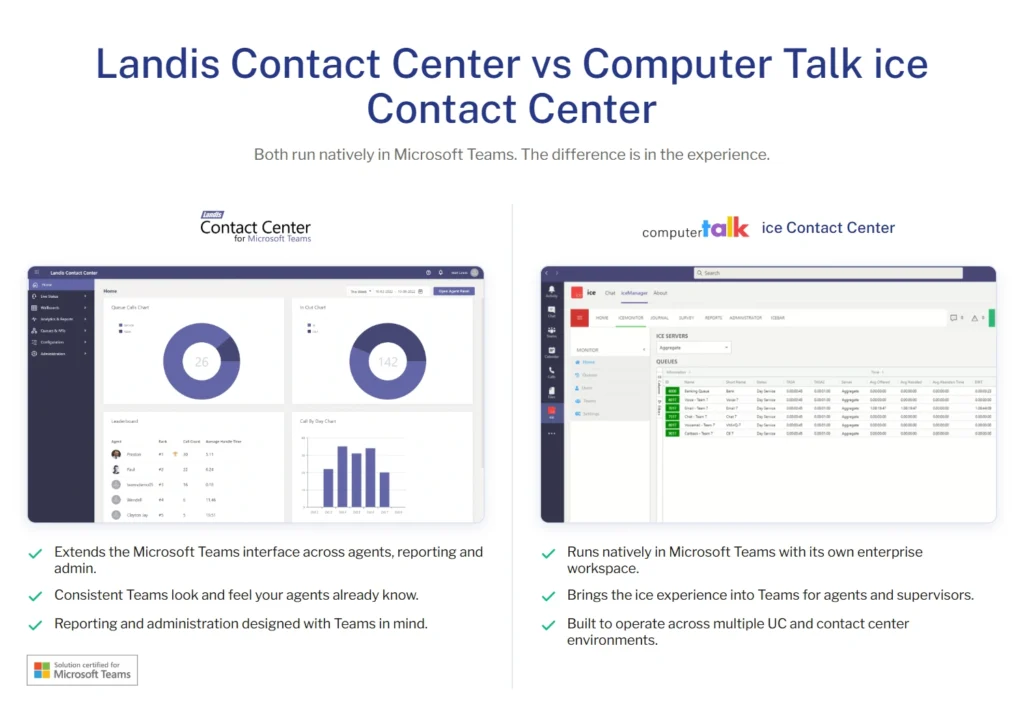
If your agents already work in Microsoft Teams, Landis extends the familiar Teams experience into a complete contact center, carrying Microsoft’s design language across customer interactions, reporting, and administration.
Computer Talk ice also runs natively within Microsoft Teams, but it brings its own enterprise contact center workspace into the Teams client. Agents stay in Teams while working within the dedicated ice interface.
The difference becomes clear when you compare the two side by side.
There are, of course, many other factors to review when comparing Landis vs Computer Talk ice. Let’s jump into the details with a high level overview.
Landis Contact Center vs ComputerTalk ice Contact Center at a Glance
| Capability | Landis | ComputerTalk ice |
|---|---|---|
| Microsoft Extend certification | ✅ | ✅ |
| Microsoft Unify certification | ✅ | ✅ |
| Native Microsoft Teams experience | ✅ | ✅ |
| Microsoft Teams design language | ✅ | ❌ |
| Primary user interface | Microsoft Teams | Dedicated contact center interface within Teams |
| Omnichannel support | ✅ | ✅ |
| AI capabilities | ✅ | ✅ |
| Public pricing | ✅ | ❌ |
Unlike many contact center comparisons, this isn’t about one platform having more features than the other. Both Landis and ComputerTalk ice provide enterprise-grade contact center capabilities with Microsoft’s highest levels of certification.
The difference is in the experience.
- Landis was designed around Microsoft Teams, extending the familiar Teams interface across customer conversations, administration, and reporting.
- Computer Talk ice delivers the same depth of Microsoft integration while presenting its own dedicated contact center application within Microsoft Teams.
For organizations that want to turn Microsoft Teams into their contact center, that distinction can have a significant impact on user adoption, training, and day-to-day productivity.
What is Landis Contact Center?
Landis Contact Center is a Microsoft Teams-first contact center built to extend Teams with enterprise customer service capabilities.
Rather than introducing a separate application for agents to learn, Landis transforms Microsoft Teams into a complete contact center while maintaining the familiar Teams experience.
The platform combines voice, digital channels, AI, reporting, and administration within an interface that follows Microsoft’s design language, helping organizations reduce context switching and improve user adoption.
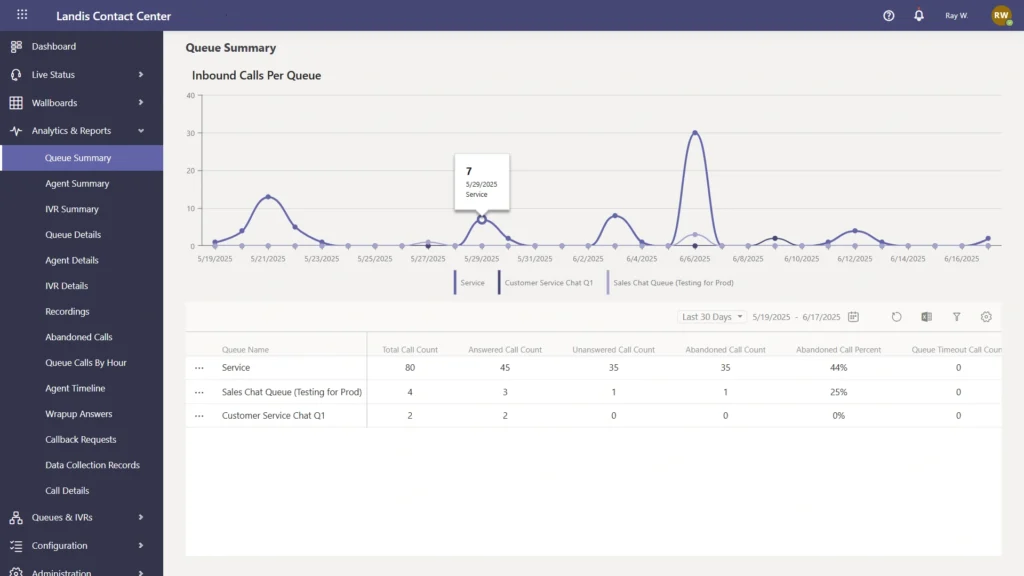
Landis’ capabilities include:
- Native Microsoft Teams contact center.
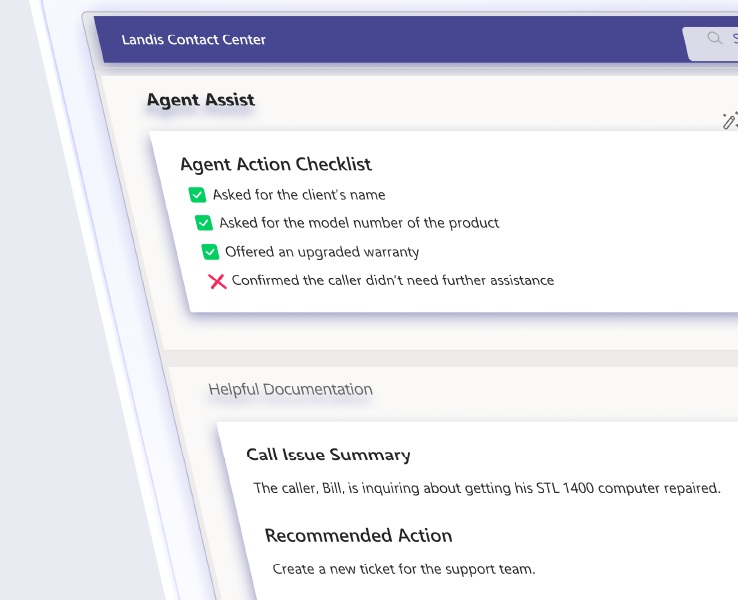
- AI-powered Agent Assist and automation.
- Omnichannel support for voice, web chat, SMS, WhatsApp, Facebook Messenger, and RCS.
- Live dashboards, wallboards, analytics, and reporting.
- Speech analytics and AI-generated call summaries.
- CRM integrations.
- Workforce management.
- Microsoft Extend and Unify certification.
Landis is designed for organizations that want Microsoft Teams to become their contact center. Rather than embedding an existing contact center application into Teams, Landis extends the Microsoft Teams experience across agents, supervisors, reporting, and administration, creating a consistent working environment that feels familiar to Teams users.
What Is Computer Talk ice Contact Center?
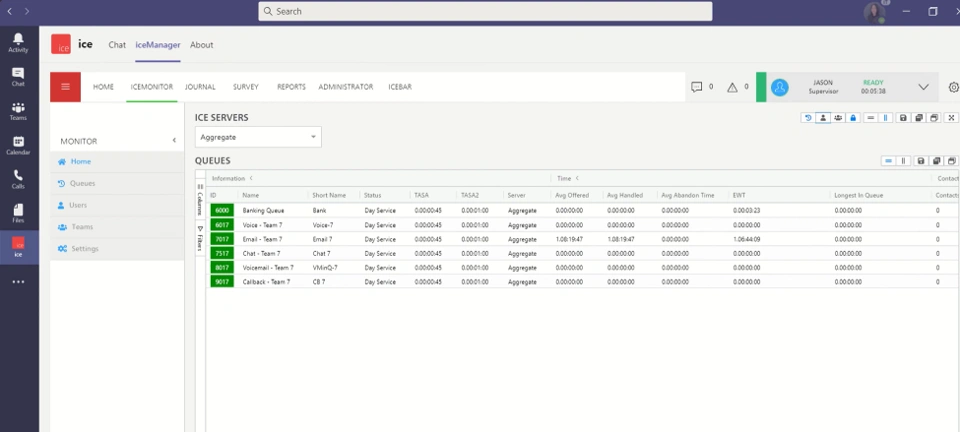
Computer Talk ice Contact Center is software that delivers a native Microsoft Teams experience while supporting organizations with more complex customer engagement requirements.
The platform combines voice, digital channels, AI, workforce engagement, reporting, and administration within its established ice workspace, which runs natively inside Microsoft Teams while maintaining the rich functionality of the wider Computer Talk platform.
Its capabilities include:
- Native Microsoft Teams contact center.
- AI-powered Agent Assist, AI Agents, AI Insights, and intelligent routing.
- Omnichannel support for voice, email, web chat, SMS, social messaging, and video.
- Speech analytics, transcription, and AI-generated summaries.
- Workforce engagement, quality management, and call recording.
- Live dashboards, reporting, wallboards, and Power BI integration.
- Microsoft Connect, Extend, and Unify certification.
Computer Talk ice is designed for organizations that want an enterprise contact center with deep Microsoft Teams integration.
Rather than extending the Microsoft Teams interface itself, it brings the full ice contact center workspace into Teams, giving agents and supervisors access to the platform’s established enterprise capabilities without leaving the Microsoft Teams client.
Key Differences Between Landis and Computer Talk ice
Computer Talk ice is designed for organizations that require an enterprise contact center across multiple communications platforms. In addition to Microsoft Teams, the platform supports environments including Cisco, Zoom, Avaya, and other unified communications ecosystems, making it well suited to businesses with diverse technology estates or mixed collaboration environments.
Landis takes a different approach. Rather than supporting multiple collaboration platforms, it is built exclusively for Microsoft Teams. That singular focus allows the platform to evolve alongside Microsoft’s roadmap, giving organizations a contact center designed specifically for Teams rather than one adapted to support multiple ecosystems.
A Long History of Building for Microsoft
One of Landis’ biggest differentiators is its long-standing investment in Microsoft’s communications platforms.
From the beginning, it’s built software that integrates deeply with Microsoft technologies, evolving alongside Microsoft’s unified communications strategy from Lync to Skype for Business and now Microsoft Teams.
Rather than entering the Teams contact center market after Teams became mainstream, Landis had already established years of experience developing Microsoft-integrated communications software.
Microsoft Timeline
- 2014: Released Attendant Pro for Microsoft Lync, helping organizations manage high volumes of inbound calls.
- 2017: Updated Attendant Pro for Skype for Business, ensuring customers could continue supporting Microsoft’s evolving communications platform.
- 2020: Released Policy Call Recording for Microsoft Teams, expanding its growing Microsoft Teams portfolio.
- 2021: Released one of the first Microsoft Teams contact center solutions built on Microsoft’s Extend integration model, followed shortly by its Microsoft Teams Attendant Console.
- 2024: Worked closely with Microsoft to help develop APIs for the new Unify integration model.
- 2025: Became one of the first contact center vendors globally to achieve Microsoft Teams Unify certification.
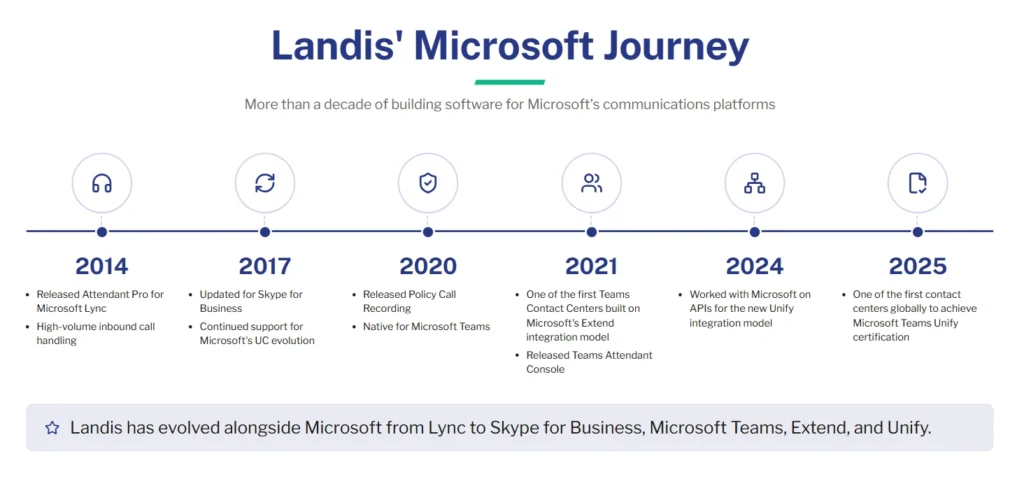
This progression demonstrates consistent investment in Microsoft’s communications ecosystem for more than a decade. As Microsoft introduced new platforms and integration models, Landis continued evolving its products to align with Microsoft’s latest architecture.
For organizations that have standardized on Microsoft Teams, that history demonstrates a sustained commitment to Microsoft’s ecosystem rather than a recent expansion into the contact center market.
Landis Contact Center vs Computer Talk ice Contact Center: Microsoft Teams Experience
Landis and Computer Talk ice have both achieved Microsoft’s highest levels of certification, including Extend, and Unify. Both platforms deliver native Microsoft Teams experiences and allow agents to manage customer interactions without leaving the Teams client.
The difference is not whether they integrate with Microsoft Teams. It’s how they extend it.
| Capability | Landis | ComputerTalk ice |
|---|---|---|
| Microsoft Extend certification | ✅ | ✅ |
| Microsoft Unify certification | ✅ | ✅ |
| Native Microsoft Teams experience | ✅ | ✅ |
| Built exclusively for Microsoft Teams | ✅ | ❌ |
| Supports multiple UC platforms | ❌ | ✅ |
Landis
Landis is built exclusively for Microsoft Teams. Every feature, workflow, and interface is designed around the Microsoft 365 ecosystem, allowing organizations to transform Teams into a complete contact center without introducing a separate collaboration platform or adapting to multiple unified communications environments.
This dedicated Microsoft focus enables Landis to evolve alongside Microsoft’s roadmap while delivering a consistent experience for agents, supervisors, and administrators.
Computer Talk ice
Computer Talk ice also delivers a native Microsoft Teams experience but is designed to support a broader range of unified communications platforms. Alongside Microsoft Teams, the platform integrates with technologies including Cisco, Zoom, Avaya, and other enterprise communications environments.
This multi-platform approach gives organizations flexibility to standardize on a single contact center across mixed technology estates while maintaining deep integration with Microsoft Teams.
Landis Contact Center vs Computer Talk ice Contact Center: Omnichannel Capabilities
Both Landis and Computer Talk ice provide enterprise omnichannel capabilities, although they differ slightly in the channels they prioritize.
| Channel | Landis | ComputerTalk ice |
|---|---|---|
| Voice | ✅ | ✅ |
| Roadmap | ✅ | |
| Web chat | ✅ | ✅ |
| SMS | ✅ | ✅ |
| ✅ | ✅ | |
| Facebook Messenger | ✅ | ✅ |
| ❌ | ✅ | |
| Video | ❌ | ✅ |
| RCS | ✅ | ❌ |
Landis focuses on the communication channels most commonly adopted by Microsoft Teams organizations, combining traditional voice with web chat, SMS, WhatsApp, Facebook Messenger, and RCS.
This gives businesses the flexibility to engage customers across today’s most widely used business messaging channels while remaining closely aligned with the Microsoft ecosystem.
Computer Talk ice offers a broader omnichannel portfolio, adding support for channels like email, Instagram, WeChat, and video alongside voice, web chat, SMS, WhatsApp, and Facebook Messenger.
Landis Contact Center vs Computer Talk ice Contact Center: Feature Availability
Landis and Computer Talk ice both deliver enterprise contact center functionality, including AI, reporting, workforce optimization, and omnichannel communications. The difference lies in how those capabilities are packaged and presented.
| Capability | Landis | ComputerTalk ice |
|---|---|---|
| AI Agent Assist | ✅ | ✅ |
| Speech analytics | ✅ | ✅ |
| CRM integrations | ✅ | ✅ |
| Workforce management | ✅ | ✅ |
| Outbound campaigns | ✅ | ✅ |
| Call recording | ✅ | ✅ |
| Power BI integration | ✅ | ✅ |
| Omnichannel routing | ✅ | ✅ |
Landis
Landis focuses on delivering a streamlined Microsoft Teams contact center with enterprise functionality built around a single platform.
Rather than presenting a large catalogue of standalone products, the platform provides the capabilities most organizations need through a consistent Microsoft Teams experience.
Computer Talk ice
Rather than focusing exclusively on Microsoft Teams, the platform is designed to provide a consistent contact center experience across multiple environments while offering a portfolio of AI, workforce engagement, analytics, and digital customer engagement capabilities.
Key Difference
Both platforms deliver the enterprise capabilities expected from a modern Microsoft Teams contact center.
- Landis prioritizes simplicity, providing a focused platform built exclusively for Microsoft Teams.
- Computer Talk ice offers a portfolio of customer engagement capabilities, making it well suited to organizations looking for a highly configurable solution.
Landis Contact Center vs Computer Talk ice Contact Center: Pricing
Pricing is often one of the biggest factors when choosing a contact center platform. While Landis and Computer Talk ice both deliver enterprise-grade Microsoft Teams contact center capabilities, they take very different approaches to pricing transparency.
| Pricing | Landis | ComputerTalk ice |
|---|---|---|
| Public pricing | ✅ | ❌ |
| Contact Center | From $75/user/month | Custom quote |
| Attendant Console | From $95/user/month | Custom quote |
| Call Recording | From $15/user/month | Custom quote |
| Volume discounts | ✅ | Custom quote |
Landis
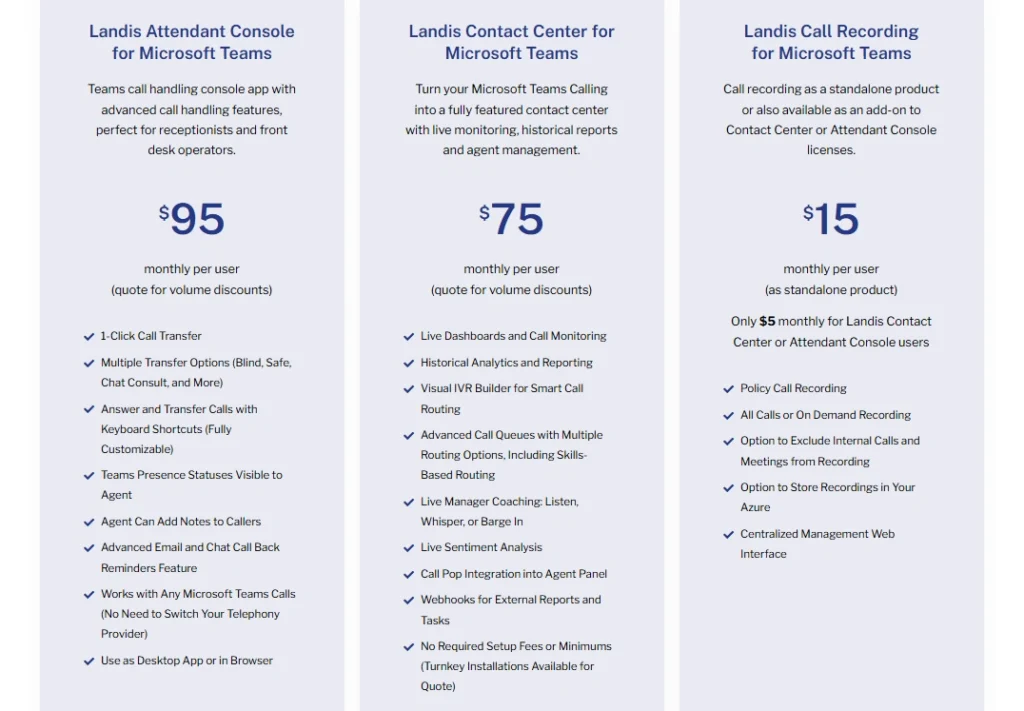
Landis publishes its pricing, allowing organizations to evaluate costs before engaging with sales. This provides IT leaders, procurement teams, and decision-makers with greater visibility during the buying process and makes it easier to compare solutions based on both functionality and budget.
Landis pricing starts at $75 per user/month, which is equivalent to $900 per user/year.
You can also see clear pricing for standalone attendant console and call recording licenses where needed.
As deployments grow, volume discounts are available, giving larger organizations predictable pricing while maintaining transparency.
Computer Talk ice
Computer Talk ice is priced through a tailored quotation process. Costs are determined by factors such as deployment size, feature requirements, support, and implementation, allowing organizations to build a solution that aligns with their operational needs.
This enterprise procurement model provides flexibility for complex deployments but means organizations typically need to engage with Computer Talk or one of its partners before understanding the total cost of ownership.
Landis Contact Center vs Computer Talk ice Contact Center: Which Is Right for You?
Landis and Computer Talk ice both represent the highest level of Microsoft Teams contact center integration available today. The right choice depends less on feature parity and more on your organization’s communications strategy, preferred user experience, and commercial requirements.
Choose Landis Contact Center if you:
- Want a contact center built exclusively for Microsoft Teams.
- Prefer a platform dedicated to the Microsoft ecosystem.
- Want Microsoft Teams to become the primary workspace for agents and supervisors.
- Value transparent, publicly available pricing.
- Prefer a streamlined buying experience with predictable licensing.
Choose Computer Talk ice Contact Center if you:
- Need to support multiple unified communications platforms alongside Microsoft Teams.
- Want a contact center that can operate across mixed communications environments.
- Prefer a solution that can be tailored through a consultative procurement process.
Final Verdict
Landis and Computer Talk ice are among the most capable Microsoft Teams contact center solutions available, with both achieving Microsoft Extend, and Unify certification.
The key difference isn’t the depth of Microsoft integration. Both platforms excel in that area. Instead, it’s where each vendor has chosen to focus.
- Landis is purpose-built for Microsoft Teams. Every aspect of the platform, from product development to customer expertise, is dedicated to helping organizations get the most from Microsoft Teams as a contact center.
- Computer Talk ice takes a broader approach. It combines deep Microsoft Teams integration with support for multiple communications platforms, making it well suited to organizations that need a contact center spanning diverse technology environments.
If your business has standardized on Microsoft Teams and wants a platform built specifically around it, Landis provides a focused, Teams-first approach. If your communications strategy extends beyond Microsoft Teams, Computer Talk ice offers the flexibility to support a wider enterprise ecosystem.
See What a Microsoft Teams-First Contact Center Looks Like
Not every Microsoft Teams contact center is built the same.
Some platforms integrate with Teams. Others embed their own applications within Teams.
Landis was built for Microsoft Teams.
Every workflow, dashboard, and customer interaction is designed around the way Teams users already work, extending the familiar Microsoft experience into a complete enterprise contact center without asking agents to learn another platform.
If your organization has standardized on Microsoft 365 and wants a contact center built specifically for Microsoft Teams, we’d love to show you how Landis works.