What is AI Agent Assist?
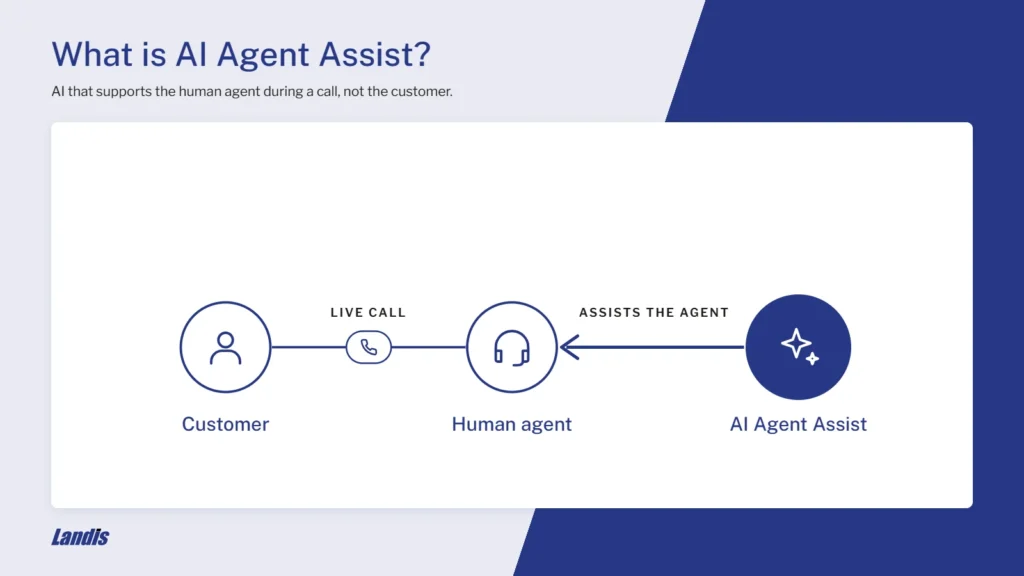
In a contact center, this is when AI model assists a human agent in customer service, rather than assisting the customer directly.
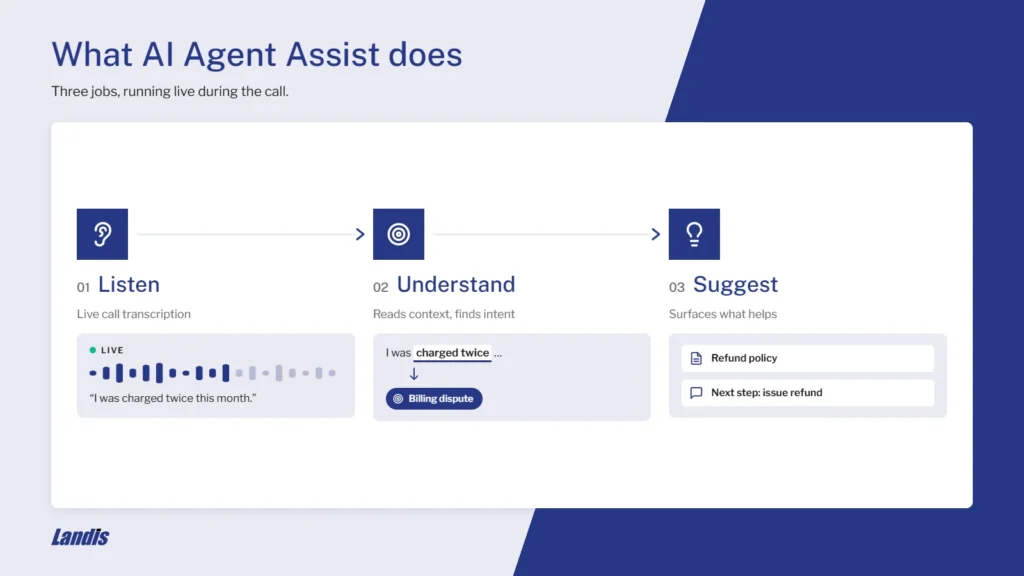
The assisting AI must do three separate things:
- Listen – this is usually a live transcription of the call
- Understand – it considers context and surfaces intent
- Suggest – whatever resources might be relevant or helpful to the human agent.
Several adjacent terms also need to be defined to avoid confusion.
The term agent is used in multiple ways in this article. In the case of AI agent, we’re of course, talking about an autonomous AI, not a human. In the case of agent assist, we mean a human contact center agent who is assisted by AI.
Chatbots and IVR are customer-facing, vs agent assist being agent-facing.
Conversation analytics and scoring happen after the call, while agent assist occurs during the call.
AI agents act autonomously and/or communicate directly with the customer. Agent assist is a hybrid model between human agents only and fully autonomous AI agents.
Agent Assist ROI
Issues solved per hour
According to a study titled Generative AI at Work, customer support agents with access to tools like AI assistance, improved their productivity by 14% on average, and novice workers improved by an average of 34%.
Escalation decrease
McKinsey also reported in The Economic Potential of Generative AI, that requests to speak to a manager decreased by 25% when agents had access to AI assistance tools.
Agent Assist vs. AI Agents
| Agent Assist | AI Agents | |
|---|---|---|
| Who the customer talks to | A human | An AI |
| Who makes the decision | The human | The AI, within its limits |
| Typical use cases | Complex or sensitive calls that require knowledge lookup, call summaries, or suggested transfers | Routine, high-volume requests like FAQs, order status, password resets, and appointment booking |
| Risk | Low; human judgment remains in control | Higher; guardrails need to be used and tested to prevent errors from reaching the customer |
How Real-Time Agent Assist Works
As mentioned before, agent assist has three parts.
Listen
The “listening” the AI does is foundational for understanding and suggesting. Several things must be in place to produce quality:
Multiple speakers
Both sides of the audio must be transcribed and attributed to different speakers if the full context of the conversation is to be understood.
Multiple languages
Transcription must be available in multiple languages and easily changeable from one language to another.
Clear audio
This is not necessarily a feature of the contact center or transcription service, but as far as possible, audio must be clear. Headsets with noise cancelling mics on the agent side help with this.
Understand
When we say the AI assisting the agent “understands” the context, it means that the LLM runs a prompt on the transcript of the live call. The prompt might be something like “suggest the best department for this call to be transferred to” or “what would be the next best action for the agent to take?”.
Some prompts are triggered by utterance of a specified word. This can be used in suggested transfer features, where the utterance trigger might be an agent name. The current phrase and a number of previous phrases are then analyzed.
Prompts can also return structured data such as JSON that fills an adaptive card. A use case might be when tables such as customer information or part data need to be displayed.
Suggest
The AI’s responses to the prompt come to the agent as suggestions.
The main quality criterion is that the agent can use the suggestion immediately. For example, a suggested transfer should not only suggest the right contact, but also display the contact so the transfer can be made instantly.
How Agent Assist is Triggered During a Call
AI prompts can be tied to a trigger.
Agent – the agent clicks a button or uses a keyboard shortcut to run the prompt on demand.
Event – events like transfers or calls ended can trigger the prompt to run.
Conversation – prompts can be triggered to run on utterance of a specified key word or phrase.
Agent Assist Use Cases
Receptionists and Operators
This and the next two sections examine how agent assist works within Landis Contact Center and Attendant Console.
A receptionist using Attendant Console frequently receives only partial information from the caller, but must provide a solution as quickly as possible.
The caller might have previously connected with an agent, but can’t remember who, (“I spoke with someone… I think his name was Andy”)
AI agent assist no longer requires the receptionist to search for a contact named Andy or Andrew or Drew, but instead, the relevant contact (or a few options) are automatically surfaced, and ready to transfer to with one click.
AI generated call summaries can also go along with this transfer, so the caller doesn’t have to repeat themselves.
Support Agents
AI can assist support agents in several ways:
- Troubleshooting
- Escalation handoff
- After-call-work.
Troubleshooting
When Attendant Console is used as a Contact Center agent and is connected to a database like technical product docs, a live adaptive card can display suggestions drawn from the knowledge base.
Escalation hand-off
When a caller requires help from a higher-level support agent or a different department, a call summary with context goes along with the transfer so the caller doesn’t have to repeat information.
After-Call-Work
After the call, the summary can be used to assist the agent in answering any wrap up questions or scheduling follow ups.
Quality Assurance
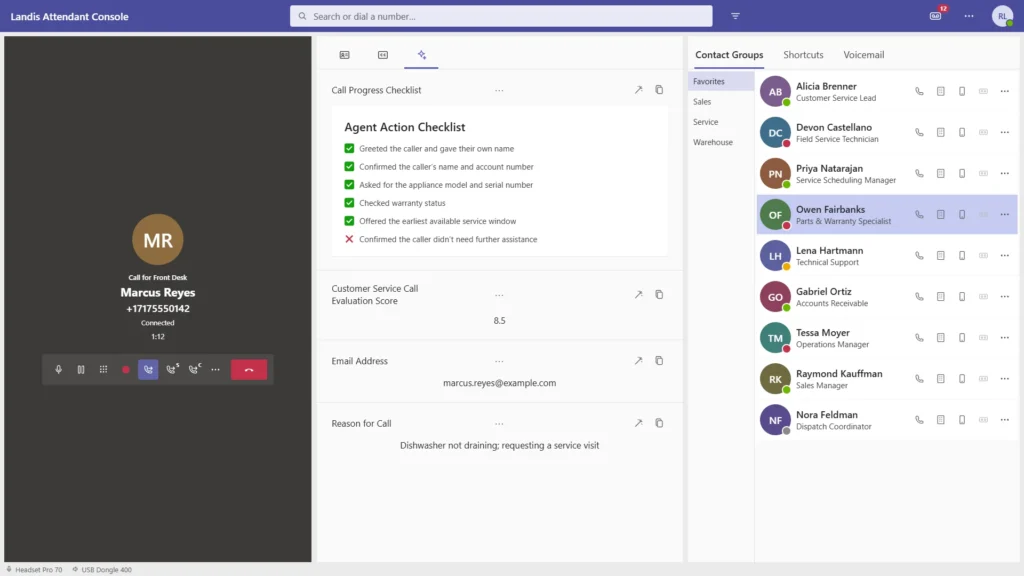
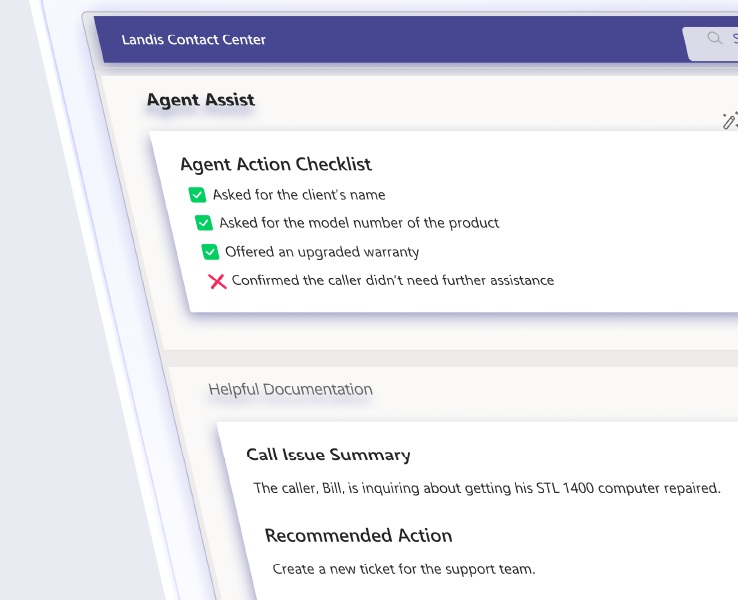
Contact center agents in the Premier Agent Panel, can set up an adaptive card to display live updates on their call quality or adherence to a quality checklist.
Sentiment analysis also provides a view of the overall tone of the call.
Benefits of Microsoft Teams-Native Agent Assist
Setup – When the contact center is already inside Teams, Copilot or any AI resource in Azure can be connected more easily since they’re already within the same system.
Security – Also, any data routed to an AI agent in Azure stays within Microsoft servers, providing a lower security risk.
Agent Assist Best Practices
Move from reactive to proactive
You likely don’t know what assistance your agents will need until they’ve actually used it for a while. Let them trigger the prompts manually, then find the most common ones before deciding what should happen automatically.
Let top performers opt out of some scenarios
The studies referenced above recorded much smaller gains for experienced agents than for newly hired agents. If experienced workers see no measurable gains from using AI assistance, let them opt out of it.
Don’t judge usefulness within 6 months
Another finding from the study on Generative AI at Work, was that initially, agents followed only around 35% of AI suggestions. However, with skeptical agents, adherence grew from 20% to over 50% in five months.
Transcript Security and Data Governance
Knowing where the call recording and transcript travel, are stored, and who accesses them is important for security.
Below is a description of how Landis handles them.
Bring your own Azure AI model
You can connect your own Azure AI agent and your own security and compliance configuration apply to interactions with it.
Transcription without recording
Attendant Console runs call transcription separately from recording, and agent assistance works without storing the audio.
Granular control over storage and retention policies
Many settings are customizable. You can choose whether or not AI responses are saved, how long and where call history is stored, and similar options for call recordings.
Agent Assist FAQ
AI agent assist listens to a live customer conversation, turns it into text, and uses AI to suggest helpful next steps to the human agent.
Agent assist supports a human agent during the conversation. An AI agent replaces the human for the conversation. With agent assist, the customer talks to a person and the AI works behind the scenes. With an AI agent, the customer talks to the AI directly. Many organizations use both: AI agents for simple, high-volume requests and agent assist for the complex calls that still need a person.
Real-time agent assist runs while the call is happening, not after it ends. It transcribes the conversation as it unfolds and surfaces suggestions on the agent’s screen, so they can act on them before the caller hangs up. In Landis, prompts can run on demand, at key moments like a transfer, or at the end of the call.
Pricing varies widely by vendor. Some charge per user, some per minute of usage, and some sell agent assist as a separate AI add-on.
The main risks are inaccurate suggestions, agents relying on the AI without checking it, and concerns about where call data goes. Agent assist reduces the first two by keeping a human in charge of every decision. Data concerns come down to governance: knowing which AI model processes transcripts, where data is stored, and for how long. Research has also found that AI suggestions help newer agents most and can distract top performers, so making prompts optional for experienced staff is worth considering.
No. Microsoft 365 Copilot is a general productivity assistant across Microsoft apps. Landis agent assist is built specifically for live call handling: it runs admin-configured prompts on the call transcript and ties them to call events like transfers and callbacks. The two work together. Landis Contact Center also integrates with Copilot Studio, so a Copilot agent can handle a chat and then hand off to a live queue.
Yes. Landis lets you connect your own Azure OpenAI deployment, so every AI feature runs through your model under your own security and compliance settings. Setup takes a few steps: choose a model, assign a role in Azure, grant one permission, and enter your endpoint details.
For live call assistance, you’ll need a Teams-native tool like Landis Attendant Console. After a one-time admin consent, users sign in with their Microsoft account. Admins then create AI prompts, choose when each one runs, and decide which prompts are enforced for the whole team.
Your contact center agents would benefit from using Landis Contact Center or Attendant Console with AI agent assistance. Watch the feature video or book a demo to see how.