Many things about moving your contact center from a legacy PBX to Microsoft Teams are, more or less, predictable. Licensing can be modeled, SBC configuration follows documented patterns, and queue setup has a process.
Number porting is the exception. It often stretches timelines, causes cutover failures, and generates the most post-migration support tickets.
Here’s how to plan for number porting success.
Table of contents
Why Porting Takes Longer Than Expected
The porting process itself isn’t complicated in theory. You submit a Letter of Authorization, your new provider coordinates with your current carrier, and numbers transfer on an agreed date. In practice though, that process depends on carriers that operate on their own schedules, support teams that may not know your account history, and coordination windows that shift without warning.
Many migration accounts describe problems such as:
- Ports that took months longer than projected
- Weekend cutover windows that carriers rescheduled without notice
- Numbers that came through with incorrect configurations
- Blocks of numbers that ported in batches
Decisions That Reduce Porting Risk
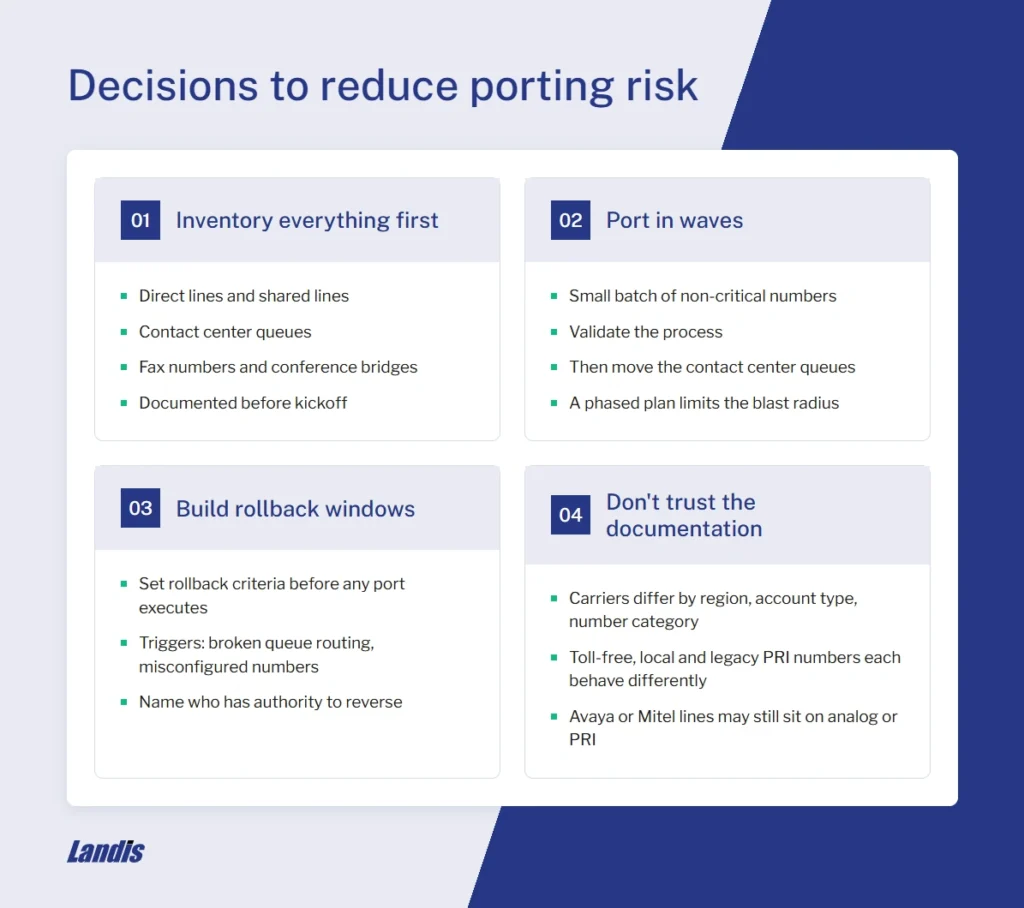
Inventory everything before you start.
Every number that needs to port should be documented before the migration project begins: direct lines, contact center queues, fax numbers, shared lines, conference bridges. Numbers that get discovered mid-project will almost certainly cause delays.
Port in waves, not all at once.
Doing a single cutover might look appealing, but a phased approach limits the effects if something goes wrong. Start with a small batch of non-critical numbers, validate the process, then move the contact center queues.
Build rollback windows into the plan.
Before any port executes, establish the rollback criteria. If queue routing breaks or numbers come through misconfigured, what’s the trigger for reversing? Who has the authority to make that call?
Don’t assume your carrier experience mirrors the documentation.
Carriers behave differently across regions, account types, and number categories. Toll-free numbers, local numbers, and numbers on legacy PRIs each have different porting behaviors. If you’re coming off an Avaya or Mitel system, some of those numbers may still be on analog lines or legacy PRIs that don’t port the same way a modern SIP trunk does. What worked for a previous migration at a different organization may not apply here.
Queue Numbers Need Their Own Plan
A direct line and a queue number don’t behave the same way during a port. When a direct line breaks, one person notices. When a queue number breaks, every caller trying to reach that queue notices, and so does every agent staffed to it.
Before a contact center number ports, confirm three things:
- Which queue it feeds
- Which routing rules apply to that queue
- Which agents are staffed to it.
Numbers get assigned to queues as a separate step from building the queue and its routing rules. If the number lands before that work is tested, calls can connect successfully and still go nowhere useful, and supervisors lose visibility into what’s happening until someone notices calls aren’t landing where they should.
This is where queue setup and number porting need to move together, not as two separate projects that happen to share a timeline. Landis has walked customers through this exact transition: DERTOUR moved from Avaya to Teams and now routes 400+ daily calls across 170 users, and ABRSM modernized off a legacy Mitel system with similar gains in reliability and simplicity.
Emergency Numbers and E911 Compliance
Under Kari’s Law and RAY BAUM’s Act, multi-line telephone systems have specific requirements around 911 dialing and dispatchable location. When numbers port to Microsoft Teams, emergency calling behavior changes, and the configuration that handled 911 on your old PBX doesn’t carry over automatically.
Kari’s Law requires that a 911 call route directly to emergency services without needing to dial a prefix first, and that it notify a person on-site, like a receptionist or security desk, when the call goes out. RAY BAUM’s Act requires that the emergency call include a dispatchable location: an address specific enough that first responders can find the caller, down to floor or suite number in a multi-story building.
Enhanced 911 is the system that carries that location data along with the call. In Microsoft Teams, dispatchable location is tied to the network sites and locations you configure in the Teams admin center, not to the phone number itself. Porting a number doesn’t automatically bring its old location data with it, so each site needs its own dispatchable location configured and tested before the numbers serving that site go live.
Before any contact center number ports, confirm three things
- Dispatchable locations are set for every office the ported numbers will serve
- Emergency calling routes correctly in your Teams environment
- Someone has placed a test call to confirm it, not just reviewed the settings in the admin center.
What to Ask Your Carrier Before Signing
Before committing to a PSTN model, get answers to these questions in writing:
- How many numbers can be ported per batch, and what’s the minimum advance notice for scheduling a port date?
- What is the process if a port fails or a number comes through with incorrect routing?
- Who is the named support contact for migration-related issues, and what is their response time commitment?
- What happens to numbers that are on legacy analog lines or PRIs that aren’t straightforward SIP ports?
Carriers that have run Teams migrations before will have clear answers. Carriers that haven’t will give you general process descriptions that don’t account for edge cases where the porting problems live.
Plan for Success
Number porting is unglamorous. It doesn’t come up in product demos, and it doesn’t appear in ROI calculations. But it’s often the thing that determines whether your contact center migration finishes on schedule or runs months over.
Give it the planning time it deserves.