Multitasking? Listen while you work!
Call center whisper is a supervisory feature that is especially helpful when training or onboarding new agents. This guide explains how it works, its benefits, and how Landis Technologies offers this feature within Microsoft Teams.
Table of contents
- What Is “Call Whisper”?
- How Does Call Whisper Work?
- Benefits of Call Whispering in Contact Centers
- Call Whisper vs. Barge-In vs. Listen-In: What’s the Difference?
- Best Practices for Using Call Whisper Effectively
- Use Cases of Call Whisper in Higher Education Contact Centers
- Landis Solutions: Whisper and More for Microsoft Teams
What Is “Call Whisper”?
Definition: Call whisper (or call whispering) is a supervisory feature that allows a call center manager to speak to an agent during a live call without the caller hearing. A manager joins the call as a hidden participant and can “whisper” coaching tips or information to the agent, supporting them mid-call without interrupting the caller.
Alternatively, the call center whisper may not come from a supervisor, but instead from an external database such as a contact center-integrated CRM system, the caller’s previous IVR selections, or even input from an AI agent.
Why Contact Center Managers Love Call Whisper
- Privacy: Only the agent can hear the whispered information; the caller simply receives better service.
- Live assistance: Supervisors can whisper information or coaching to agents during difficult calls.
- Automated coaching: Some systems can automatically deliver information about the caller (account status, previous interactions, etc.) as the call connects.
- Training: New agents can receive instant support without callers perceiving any uncertainty.
- Quality assurance: Supervisors can assist during calls to ensure protocols are followed.
How Does Call Whisper Work?
Basic Mechanism
The exact steps can vary between contact centers, but the core process of Call Whisper involves a manager silently joining a call to listen and speak only to the agent while the caller is unaware.
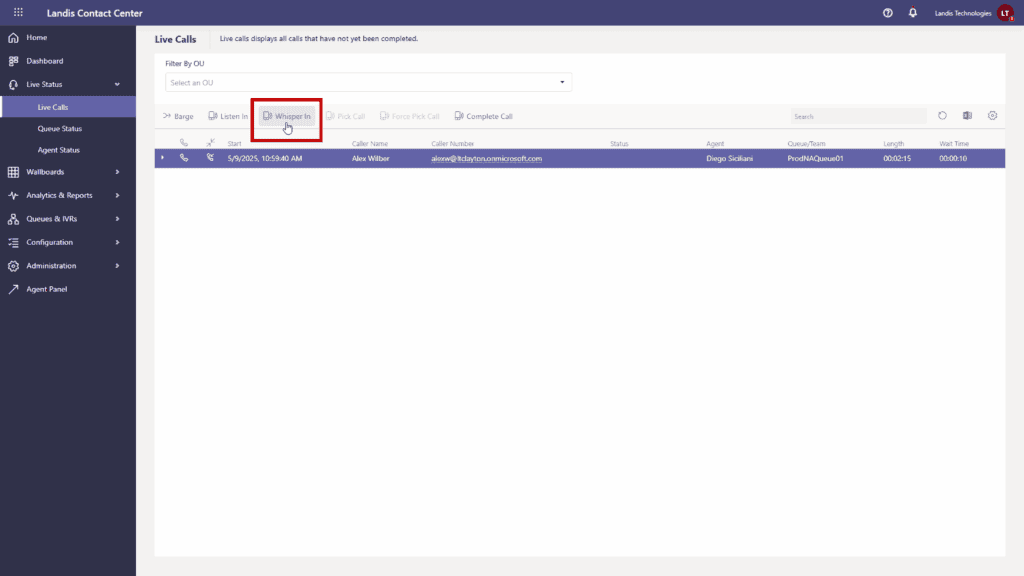
For example, to use Call Whisper in Landis Contact Center, a manager can navigate to the Live Calls tab, find the call to join, and click the “Whisper In” button next to it. This action will trigger an incoming Microsoft Teams call to the manager’s device. Upon answering, the manager will be connected to the live call as a hidden participant where they can then hear both the agent and the caller, but only the agent can hear the manager.
Requirements
The feature must be enabled within the Landis Contact Center configuration, and supervisors must be assigned roles that allow them to view live calls and perform whisper actions. A Microsoft Teams client must be installed and available to receive the whisper call, as the feature relies on Teams to connect the supervisor.
When/How to Initiate Whisper
Call Whisper should be used when live guidance can improve the outcome of a call. It’s also important to let agents know that Whisper is part of quality assurance and coaching – not a controlling move.
A supervisor may initiate whisper mode when they see a call deteriorating – perhaps hearing escalating voices or noticing negative sentiment flags in real-time analytics – or agents themselves may request whisper assistance.
Whisper is also a powerful tool for call center agent onboarding. In the beginning, supervisors can join a new hire’s calls, whispering instructions and tips to help them navigate requests, or learn new tools and best practices.
Benefits of Call Whispering in Contact Centers
1. Real-time Coaching and Feedback
Since whisper happens as the call unfolds, it can dramatically improve First Call Resolution (FCR) rates.
2. Faster Training and Onboarding
Instead of long shadowing periods, new agents handle calls very quickly and make fewer mistakes because a supervisor can whisper hints or corrections as needed.
3. Higher Call Quality and Customer Satisfaction
Customers who have waited in a queue don’t want to be put on hold repeatedly or given “I’m not sure” answers. Whispering allows agents to answer confidently with supervisor-backed information.
4. Improved Agent Morale
Knowing that a supervisor “has their back” can significantly reduce an agent’s anxiety. Over time, this on-demand support builds confidence because they feel more prepared and less isolated when tackling tough queries.
5. Higher Sales and Upsell Success
For contact centers with sales or fundraising roles, Whisper can allow coaches to give timely information or reminders to upsell/cross-sell.
6. Maintains Call Flow (Non-Disruptive Coaching)
Unlike barging in on a call where the manager can also speak to the caller (which can also be useful), Whisper is subtle. The customer’s conversation with the agent isn’t interrupted by a third voice. This can bring about secondary gains like lower Average Handle Time (AHT) and higher caller satisfaction with the agent’s perceived abilities.
Call Whisper vs. Barge-In vs. Listen-In: What’s the Difference?
Call Monitoring/Listen-In (Silent Monitoring)
Call monitoring can be used as an umbrella term to cover Listen, Whisper, and Barge; but here we use it to refer to silent monitoring only.
With silent monitoring, the supervisor can hear both agent and caller, but neither party knows (or only the agent knows, depending on policy). Companies often use it for quality assurance or training review. With monitoring alone, the supervisor cannot coach in the moment; only observe.
Call Whisper (Whisper Coaching)
As stated above, whisper is like monitor mode with an added ability for the supervisor to talk to the agent. The caller is oblivious, and the conversation is not interrupted.
Call Barge-In (Call Barging)
With barge-in, the supervisor joins the call fully, making it a three-way call where each party can hear all of the others. This is usually for times when a situation escalates beyond the agent’s control and requires intervention.
Barging can be a double-edged sword, because it is more intrusive. It can be very helpful for de-escalation or handling abusive callers, but it does break the one-to-one rapport of caller to agent.
If using barge-in, it is sometimes required – and always courteous – to let callers know that a manager may monitor or join the call for training or support.
Call Monitoring Features Comparison
| Feature | Listen | Whisper | Barge |
|---|---|---|---|
| Who can hear what | Supervisor hears agent and caller | Supervisor hears agent and caller; agent hears supervisor | All parties hear each other (three-way call) |
| Caller awareness | Unaware of supervisor | Unaware of supervisor | Aware of supervisor |
| Agent awareness | May be aware or unaware depending on policy | Aware of supervisor | Aware of supervisor |
| Primary purpose | Quality assurance, training review | Live coaching, guidance | Intervention, escalation handling |
| Intrusiveness level | Low (no disruption) | Medium (only disrupts agent) | High (disrupts call flow) |
| Impact on caller-agent rapport | None | Minimal | Potentially significant |
| Best used for | Post-call assessment, evaluations | Helping new agents, complex scenarios | De-escalation, abusive callers, urgent situations |
| Limitations | No real-time intervention capability | Caller remains unaware of coaching | May undermine agent authority |
| Notification requirements | Varies by policy | Varies by policy | Often requires caller notification |
| Intervention ability | None | Indirect (through agent) | Direct |
Best Practices for Using Call Whisper Effectively
Keep It Brief and Timely
Supervisors should whisper succinct, clear instructions. Very long or frequent whispers can distract the agent and even delay their response to the customer.
For example, “Ask about their account number now” works better than “Hey, I just wanted to suggest that it might be a good time to ask the caller for their account number. It’ll help you pull up their information faster next time, and from what I can tell, they seem ready to provide it.”
Sometimes, all the agent needs is a reminder of something that they have simply forgotten to do. In this case, something as simple as “account number” is even more efficient.
Choose the Right Moments
Not every call needs whisper coaching. Use it only when it truly adds value, such as when an agent is struggling or when a high-stakes call could greatly benefit from expert input. If used on every call, agents might feel micromanaged or become too reliant.
Train Your Team on Whisper Mode
For Supervisors
Provide training or scripts on how to whisper effectively. If they practice, they will be able to deliver higher quality feedback during a live call.
For Agents
Teach agents the multitasking skills needed to listen to the supervisor’s voice in one ear while still engaging the customer. With practice, agents can nonverbally acknowledge the advice and implement it smoothly.
Technical Setup and Quality
Any lag or volume issue could render the whisper useless. So make sure the agent can distinguish the supervisor’s voice clearly. This might mean doing a quick technical check of headsets and having a quiet background for the supervisor.
Privacy and Courtesy
Whisper should be used ethically. When using Barge, inform customers for compliance. With whisper, since the customer isn’t directly involved, it’s more of an internal policy consideration. However, maintain professional decorum – keep the supervisor’s whispered comments respectful and appropriate, as they are often recorded.
Analyze Whisper Usage
A pro tip for managers: track and review calls in which Whisper has been used. This can highlight coaching opportunities or knowledge base gaps. For example, if supervisors find themselves whispering the same answer repeatedly, that indicates a training gap or an FAQ that agents should learn. Over time, effective coaching should reduce the need for Whisper on routine questions.
Use Cases of Call Whisper in Higher Education Contact Centers
Since many Higher Ed institutions employ student agents – meaning high turnover – whisper coaching can be exceptionally helpful. Here are some examples of how a manager might use whisper.
Admissions and Enrollment Calls
University call centers often have teams handling prospective student inquiries such as admissions, and these calls can make or break a student’s decision to enroll. Using call whisper, an experienced admissions supervisor can guide a newer advisor through tricky questions on the fly.
If a prospective student asks an unusual question about program prerequisites or scholarship details and the agent is unsure, a supervisor can whisper the correct information or prompt the agent to mention a particular program feature. From the caller’s perspective, the agent is exceptionally knowledgeable, which can improve the likelihood that they will apply or enroll.
Student Support Help Desk (IT or Registrar)
Many campuses have help lines for current students’ inquiries such as IT support, registration issues, housing, etc. A manager can use whisper to assist student employees or junior staff who handle these support calls.
Imagine a student worker at the IT help desk getting a call about a complex network issue they haven’t seen before. Rather than escalating or putting the caller on hold for long, a supervisor can quietly step in via whisper, guiding them through diagnostics or providing the solution steps.
Alumni Relations and Fundraising
Universities frequently call alumni or donors for fundraising campaigns. In these quasi-sales calls with real monetary stakes, using whisper coaching during a donor outreach call can help a fundraiser handle objections or tough questions.
For instance, if an alum asks about how funds will be used and the caller is unsure, a supervisor can whisper a concise talking point or a statistic for credibility. This can be the difference between securing a donation or not.
Internal Departmental Call Centers
Universities also have internal call centers (e.g., HR or IT support for faculty/staff). Team leads can similarly use whisper to coach these internal service desk calls and ensure faculty get correct info without multiple transfers.
Landis Solutions: Whisper and More for Microsoft Teams
If you’re managing calls within Microsoft Teams, especially in a university or student support setting, Landis makes it easy to bring whisper coaching and advanced monitoring features directly into your existing environment.
Built for Microsoft Teams
Landis Contact Center for Microsoft Teams integrates natively with Microsoft’s communication APIs. That means features like whisper, listen, and barge are available right inside the Teams interface. Call audio stays within your secure Azure environment, and agents and supervisors use the same familiar tools they already rely on for collaboration.
For IT and administrative leaders in higher education, this native Teams integration makes it simple to roll out modern call center capabilities that scale with enrollment seasons, support cycles, and department needs.
Whisper, Listen, and Barge Features
Landis Contact Center offers these three live call monitoring modes for supervisors:
- Listen allows a manager to silently monitor a live call.
- Whisper lets them speak privately to the agent, without the caller knowing.
- Barge fully brings the supervisor into the call to participate directly.
These features are one-click actions in the supervisor dashboard. From within Teams, a supervisor simply selects a live call, clicks “Whisper In,” and receives a Teams call. Once answered, they can hear both parties and coach the agent discreetly.
AI-Powered Prompts and Insights
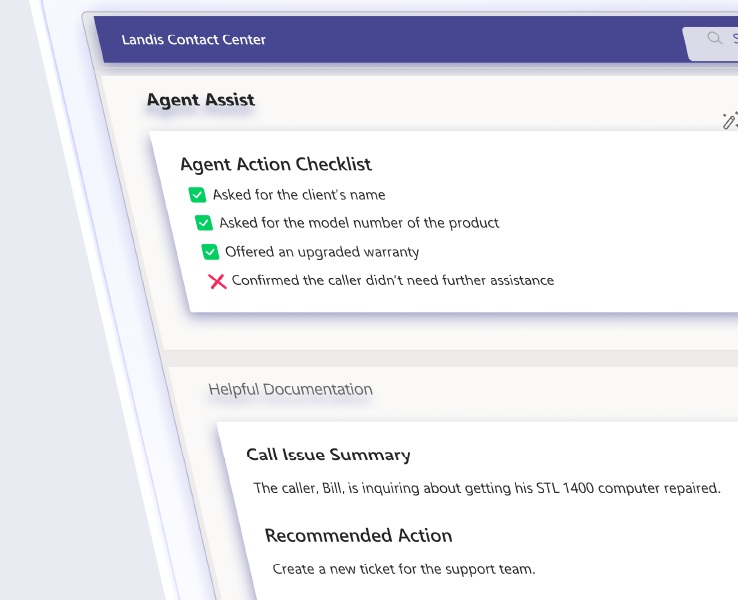
Beyond traditional Whisper, Landis goes to the next level by offering Whisper coaching via AI. In the Landis Attendant Console for Microsoft Teams, you can set up custom AI prompts that analyze real-time call transcripts to generate call summaries, action lists, or coaching hints
These prompts can alert an agent – just like a whisper – if they haven’t asked a key question or stayed on script. It’s a way to extend supervisor-level support to every call, even when no one is listening live.
Beyond Call Whisper: Landis’ Visual Monitoring
As useful as classic call whisper is, it has a significant limitation: supervisors must actively listen to one call at a time or jump between calls which can be tedious and time consuming.
Landis offers a visual monitoring approach that displays live call transcripts of multiple conversations simultaneously. Supervisors can scan several calls s at once, which also have color-coded sentiment analysis.
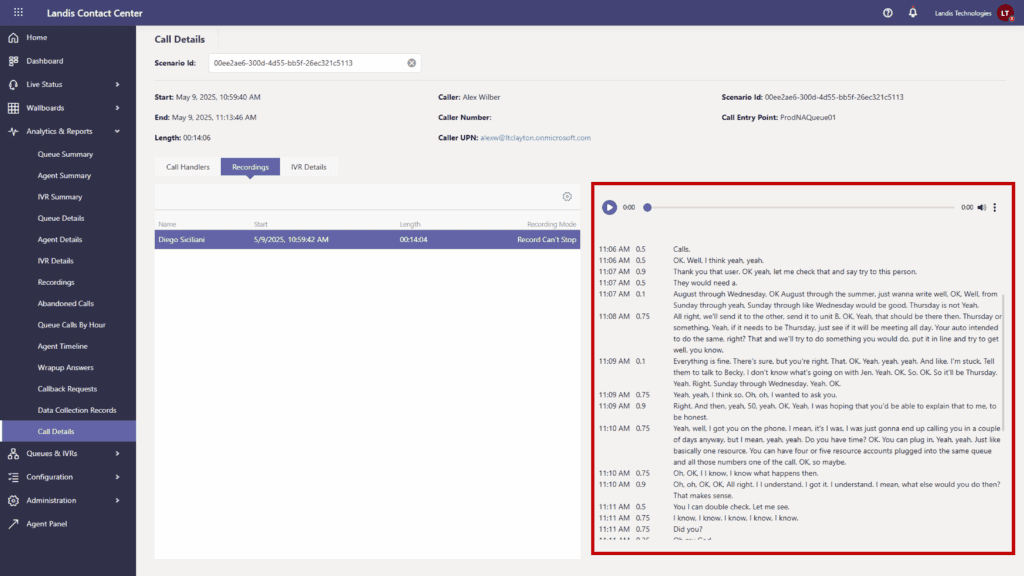
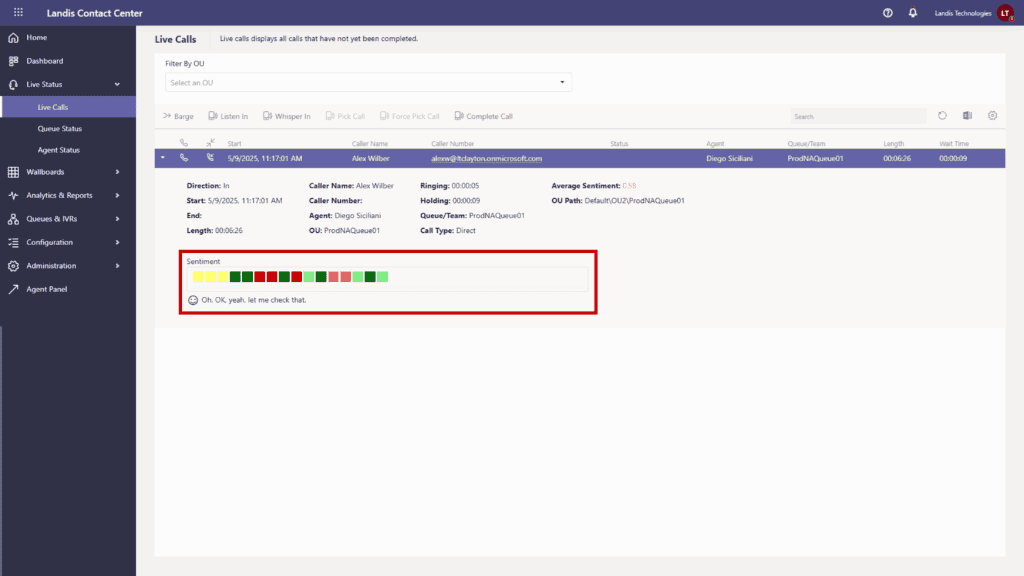
Instead of being tied to a single whisper session, managers can connect with multiple agents via Teams chat to provide guidance, share knowledge base links, or send quick tips.
Higher Ed Use Cases with Landis
For higher education institutions, the flexibility of the Landis platform directly supports seasonal call volumes, student worker onboarding, and departmental oversight:
- An admissions supervisor can whisper to a new agent on a call with a prospective student—no extra hardware, just Microsoft Teams.
- A help desk manager can monitor several student support calls at once, whispering or barging in when needed, without leaving the Teams interface.
- Flexible licensing supports peak periods like registration or financial aid season, and the simple UI ensures even student employees get up to speed quickly.
After the call, supervisors can review transcripts, sentiment scores, and call performance metrics to gauge the helpfulness of their interventions. These insights also support broader reporting to help your institution improve first-call resolution, response times, and overall call center quality monitoring.
Attendant Console for Front Desk Scenarios
The Landis Attendant Console for Microsoft Teams also provides important value for front desk assistants or receptionists. While focused on call handling and transfers, it connects to Landis Contact Center queues and includes AI prompts for coaching support. That means even operators or receptionists can request help or receive real-time hints.
Ready to Enable Whisper Coaching in Teams?
Landis Technologies makes it easy to deploy whisper and other advanced contact center features—right within Microsoft Teams. With a flip of a switch, you gain real-time monitoring, discreet coaching, and AI-enhanced insights without leaving your current ecosystem.
To explore more about how whisper works in your environment, check out Contact Center for Microsoft Teams or request a personalized demo from our team.