Landis Attendant Console Articles

Discover articles, product updates, and practical tips to help receptionists and high-volume call handlers streamline communications, route calls more efficiently, and provide exceptional service—all within the familiar Teams interface. Explore how organizations are enhancing their front-line call experiences with powerful, Teams-native tools designed for speed, clarity, and control.

Microsoft Teams Transfer Calls

Landis Provides Free Work Around to Current Microsoft Degradation That Doesn’t Allow Teams to Transfer Calls from Call Queues

Microsoft Teams customers are experiencing a temporary Microsoft Teams related issue/degradation that is not allowing users to transfer or place calls on hold that come from a Call Queue.

Landis Provides Free Work Around to Current Microsoft Degradation That Doesn’t Allow Teams to Transfer Calls from Call Queues Read More »

Microsoft Teams Now Can Nicely Share Headset Button Control with Other Apps

Landis works to design and build excellent Attendant Console and Contact Center agent user experiences for Microsoft Teams. This means working alongside Microsoft Teams client app smoothly. A few components needed to achieve a second Teams app working well with Teams Desktop client: For some time, the Landis Attendant Console for Microsoft Teams desktop app has had the ability to

Microsoft Teams Now Can Nicely Share Headset Button Control with Other Apps Read More »

Microsoft virtual Front Desk

Microsoft Teams Virtual Front Desk: How It Works & Using with Landis Attendant Console & Contact Center

Microsoft has recently announced Virtual Front Desk (VFD), a feature on Teams Display devices that turns them into virtual receptionists. VFD functionality allows a Teams Display device to take the place of a physically present receptionist. This includes a welcome text message shown on the device and an on-screen button that visitors can tap to

Microsoft Teams Virtual Front Desk: How It Works & Using with Landis Attendant Console & Contact Center Read More »

What is an Attendant Console for Microsoft Teams?

What is a Microsoft Teams Attendant Console? A soft client attendant has the following features: A client optimized for handling multiple voice calls efficiently and quickly, especially transferring calls; Common, everyday tasks should be efficient; Easily search contacts, easy access to a large amount of contacts & quick overview of their status; Easily see caller context and provides ability to tailor receptionist experience, customize to fit needs.

What is an Attendant Console for Microsoft Teams? Read More »

Microsoft Teams In A Call Indicator

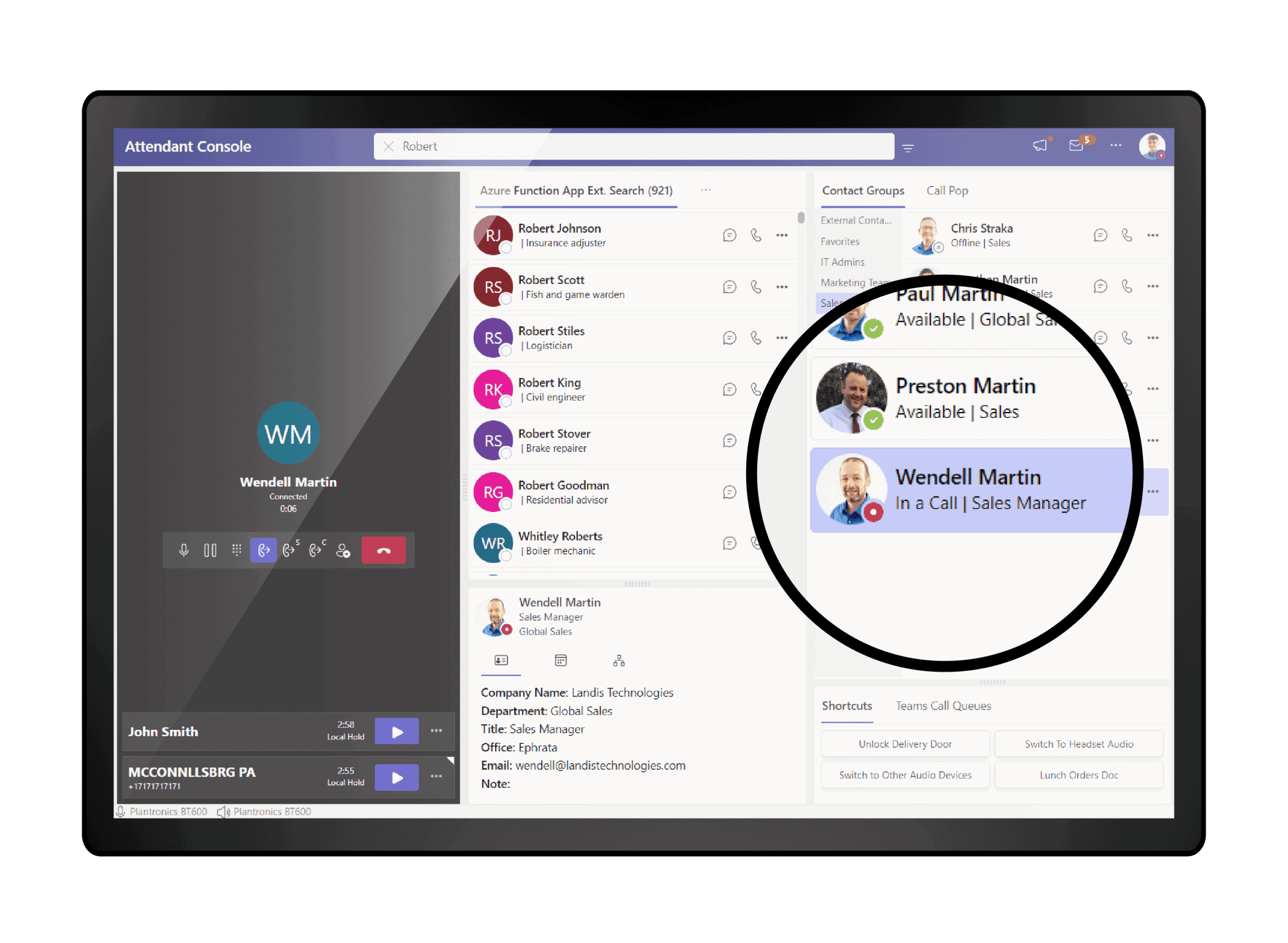
Update Brings “In a Call” Visual Indicator, Very Peri & More to Landis Attendant Console for Teams

3/3/2022 – Landis Technologies continues a constant update schedule to continue to make the Landis Attendant Console for Microsoft Teams the ideal, go-to receptionist console for Microsoft Teams around the world. In their latest update they continue emphasizing their solution \”Is Familiar & looks & feels just like Microsoft Teams\” by utilizing the Very Peri color in themes while adding features to enhance call handling like a distinct presence indicator for when contacts are \”In A Call\” versus \”Busy\”.

Update Brings “In a Call” Visual Indicator, Very Peri & More to Landis Attendant Console for Teams Read More »

Landis Attendant Console for Microsoft Teams Now Available.

Landis Attendant Console for Microsoft Teams is Now Available

Landis Attendant Console for Microsoft Teams is now Public Preview and you can start a free 30 day trial immediately by going to https://ac.landis.cloud today. This trial is fully functional.

The Landis Attendant Console is an client for Microsoft Teams that is simple to setup (just sign in with a MS Teams user), looks and feels just like Microsoft Teams, provides efficient, 1 click call transfer and is a trusted solution that just works.

Landis Attendant Console for Microsoft Teams is Now Available Read More »

Landis Contact Center & Attendant Console for Microsoft Teams on Windows 11

6/30/2021 – \”Teams is very key to Microsoft\’s Windows 11 strategy and Landis Technologies is moving quickly to do initial validations that our Teams solutions.\” says Landis Technologies ceo Matt Landis. \”Our initial testing of both Windows 11 and Windows 11 with Landis Contact Center and Attendant Console for Microsoft Teams has been very positive. We expect them to be an excellent combination.\”

Landis Contact Center & Attendant Console for Microsoft Teams on Windows 11 Read More »

Extend Skype for Business Online usage

How to Extend Skype for Business Online Usage Beyond July 31, 2021

Some of our Skype for Business Online users need additional time to upgrade their Attendant Console for Skype for Business or other Skype for Business extensions like Attendant Console, Public Announcement System, Door Bell, Elevator Phone, Virtual Receptionist or other ISV solution to Microsoft Teams. If you need additional time to upgrade to Microsoft Teams you request an extension.

How to Extend Skype for Business Online Usage Beyond July 31, 2021 Read More »

Scroll to Top

Get in Touch

Purchase Attendant Console.

High-tech IT solutions by Landis Technologies for innovative business growth.