Every time a call is transferred, CSAT drops by 12% according to SQM Group’s research. Callers hope to be connected to the most helpful agent right away, and skills-based routing solves that problem.
Instead of sending a call to the agent next in line or the one who’s been idle the longest, skills-based routing sends the call to the agent most qualified to handle it.
Table of contents
What Is Skills-Based Routing?
Skills-based routing is a call distribution method that matches incoming calls to agents based on defined skills instead of availability alone.
An admin defines the skills to be used (languages, product lines, technical tiers, etc.), assigns agents to those skills, and sets up queues that require them.
Compared to other routing logic: round robin sends calls to agents in rotation, and longest idle sends the call to whoever’s been waiting the longest. See skills based routing compared to other kinds of routing.
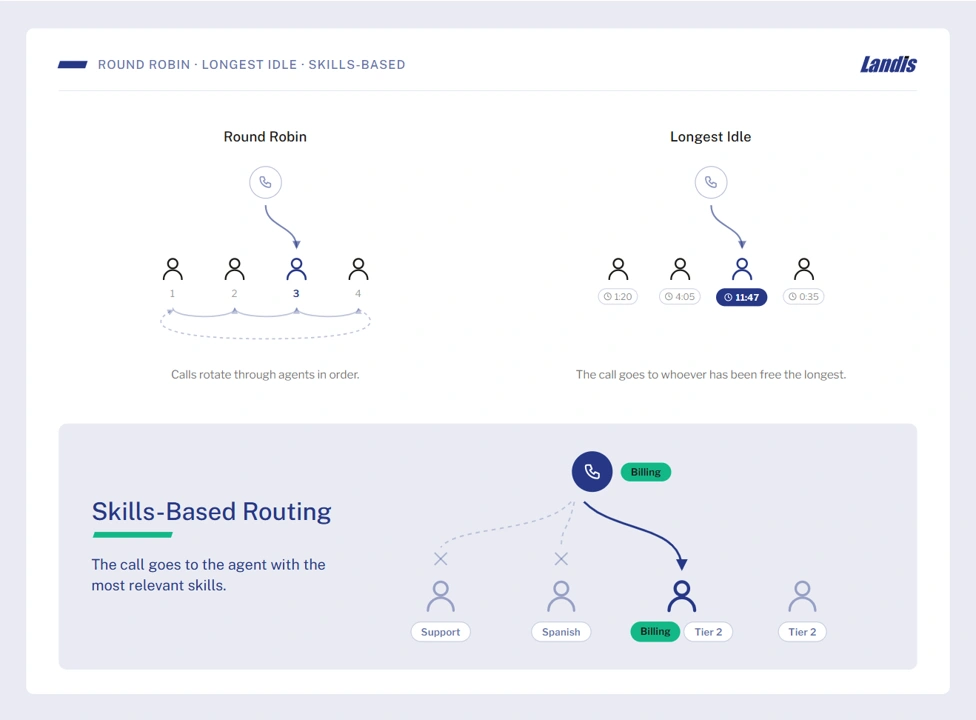
Skills-based routing is one of several intelligent routing strategies, and can also apply to chat, email, and ticketing systems. But this guide focuses on voice, since that’s the most frequent use case.
Benefits of Skills-Based Routing
Skills-based routing improves a handful of call center metrics that contact center teams probably already track.
Fewer transfers
When the first agent who picks up is already qualified, there’s no transfer to another agent. This, of course, improves average handle time since the caller didn’t have to repeat themselves.
Higher first-call resolution
Multiple analyses put the FCR gain from skills-based routing in the 5-15% range, with customer satisfaction scores climbing alongside it.
Lower training burden
New agents can be useful with a smaller set of skills, since they can take calls that match what they currently have; then they can add more as they grow.
Better use of specialists
The most technical or best bilingual agents will stop getting calls they’re overqualified for and start getting the ones only they’re best suited to handle.
How Skills-Based Routing Rules Work
The mechanics are more detailed than “route to the best agent.” Here’s the set up sequence, using Landis Contact Center as an example.
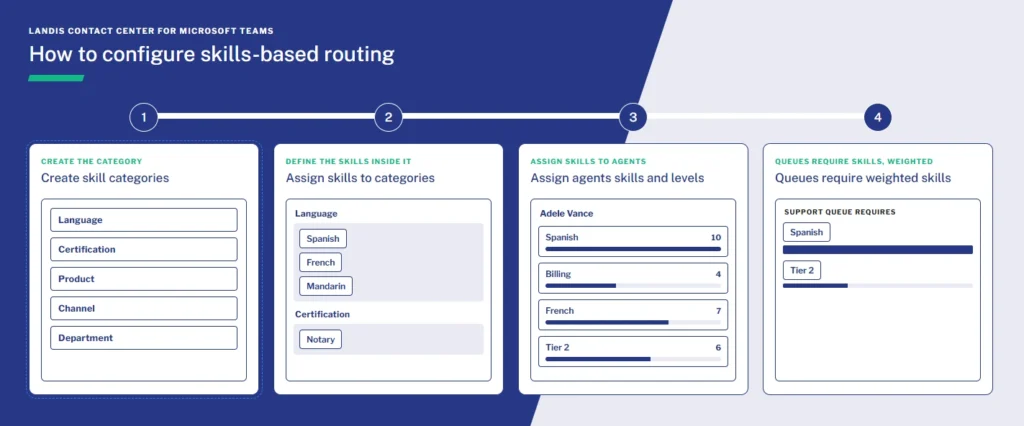
Skill categories come first
An admin creates a category, like “Language” or “Product Tier,” at the organization level. Categories hold individual skills: “Language” might contain “Spanish” and “French.” “Product Tier” might contain “Enterprise” and “Standard.”
| Category | Example Skills |
|---|---|
| Language | Spanish, French, Mandarin, German |
| Product Tier | Enterprise, Standard, Trial |
| Department | Billing, Technical Support, Sales, Retention |
| Product Line | Contact Center, Attendant Console, Call Recording |
| Seniority | Tier 1, Tier 2, Escalation Specialist |
| Certification | Security-Cleared, HIPAA-Trained, PCI-Compliant |
| Customer Segment | VIP, New Customer, Government |
| Channel | Voice, Chat, Email, SMS |
| Region | East Coast, West Coast, EMEA |
Agents get assigned skills and a proficiency level
Not every Spanish speaker is equally fluent, and not every agent certified on a product is equally experienced. Proficiency scoring ranks agents within a skill instead of treating it as a yes-or-no toggle.
An example agent skill profile might look like this.
Agent Profile: Diego Siciliani
| Category | Skill | Proficiency (1-10) |
|---|---|---|
| Language | Spanish | 10 |
| Language | English | 8 |
| Product Tier | Enterprise | 9 |
| Product Tier | Standard | 7 |
| Department | Technical Support | 9 |
| Department | Billing | 4 |
| Product Line | Contact Center | 10 |
| Product Line | Attendant Console | 6 |
| Seniority | Tier 2 | 8 |
| Certification | PCI-Compliant | 7 |
| Customer Segment | VIP | 8 |
| Channel | Voice | 9 |
| Channel | Chat | 6 |
| Region | East Coast | 9 |
Queues require specific skills, weighted by importance
A queue can require one skill or several. If a queue needs both French and technical support, you can weight each requirement.
The system builds a ranked list and works down it
When a call comes in, the queue generates a list of qualified agents ordered from strongest to weakest match. The call goes to the top of that list if they’re available. If not, it moves to the next agent.
There’s a fallback
If nobody qualifies, the call falls back to standard routing, so it still gets answered, just without the skill match.
Full configuration steps are in the Landis Contact Center documentation if you’re setting this up directly.
Skills-Based Routing Best Practices
Setting this up well is less about the software and more about the decisions made before configuration.
Base skill categories on call data
Look at what calls are about: languages requested, products mentioned, technical complexity. Building categories around the real calls beats building them around an org chart.
Keep categories broad and skills specific
“Language” is a category. “Spanish” is a skill inside it. This keeps routing rules organized as more skills get added, and it avoids a pile of unrelated one-off tags.
Weight importance deliberately
Not every required skill should carry equal weight. If a queue needs both a language match and a technical certification, decide which one matters more for that queue and weight it accordingly. Weighting everything at maximum defeats the purpose of weighting.
Watch queue timeout relative to matching time
It is possible for calls to drop into an overflow queue even before an agent is alerted, if the queue timeout is shorter than the time it takes to work through the skill-matched list.
Configure a fallback path
Keep standard routing as a fallback so the queue is functional even when nobody has the exact skill.
Revisit the setup multiple times
As agents get trained on new products, or certifications lapse, skills change. Treat skills as something to review on a regular cadence, not something configured once and forgotten.
Skills-Based Routing vs. Queue-Based Routing
“Queue-based routing” usually routes based on order and availability rather than skill. Here’s a comparison of the routing types available in a Teams contact center queue.
| Routing type | Sends the call to | Best when |
|---|---|---|
| Serial | Agents in a set order, one at a time | A predictable, prioritized alert sequence matters |
| Round Robin | The next agent in rotation | Work should be spread evenly across a team |
| Longest Idle | Whoever has been idle the longest | Fairness in idle time matters most |
| Parallel | All available agents at once | Speed of pickup matters more than who answers |
| Skills-Based | The agent(s) qualified for the specific need | Calls vary by language, product, or complexity |
(Landis also supports presence-based routing, which factors in an agent’s Teams status. It’s related but separate from skill matching.)
The trade-off is that skills-based routing can make callers wait slightly longer for the right agent instead of the next available one. Operations research on call centers has studied this. Matching by skill improves service quality, but only if there are enough cross-trained agents that no single skill group gets starved.
Most contact centers don’t pick one or the other. Skills-based routing handles the queues where expertise is important, and falls back to standard routing when no qualified agent is available.
Skills-Based Routing in Microsoft Teams
Native Microsoft Teams calling does not include skills-based routing. It’s one of several gaps that appear as call queues grow. Microsoft’s Queues app supports basic distribution methods like attendant routing, serial, round robin, and longest idle, but has no concept of agent skill, a limit confirmed in Microsoft’s own documentation.
Landis Contact Center supplies skills-based routing within Microsoft Teams. Skill categories, proficiency levels, and queue requirements are configured in the same admin portal used for every other queue setting.
FAQ: Common Skills-Based Routing Questions
Queue-based routing (round robin, longest idle, serial, parallel) sends calls based on order or availability. Skills-based routing sends calls based on which agent is qualified to handle the specific need.
There’s no universal algorithm, but the common approach ranks available agents by how well they match a queue’s required skills, weighted by importance, and routes to the top of that list.
When calls vary by language, product line, or technical complexity, and when sending the wrong caller to the wrong agent affects the transfer rate or handle time.
No. The native Queues app supports basic routing methods but not skill-based matching.
Yes. A queue can require multiple skill categories at once, each weighted by importance, so the system knows which requirement to prioritize.
For companies evaluating whether their current setup can support this kind of routing, or moving to one that can, Landis Contact Center for Microsoft Teams provides skills-based routing natively inside Teams.